Loading
Get Usda Ad-2047 2021-2026
How it works
-

Open form follow the instructions
-

Easily sign the form with your finger
-

Send filled & signed form or save
How to fill out the USDA AD-2047 online
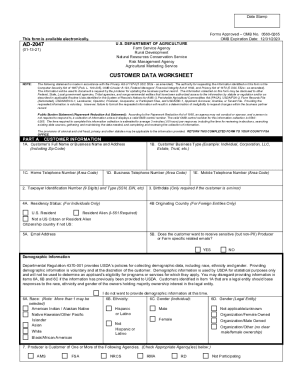
The USDA AD-2047 form is essential for documenting updates to business partner records within USDA agencies. This guide provides a clear and concise method for filling out the form online, ensuring users can easily navigate each section.
Follow the steps to complete the USDA AD-2047 form online.
- Click ‘Get Form’ button to obtain the form and open it in the editor.
- Begin with Part A, where you will need to enter your customer information. Start with the customer's full name or business name and address, including the zip code.
- Proceed to enter contact information. Fill in the home telephone number, business telephone number, and mobile telephone number where applicable.
- Specify the customer business type, choosing one that best fits your situation, such as individual, corporation, LLC, estate, or trust.
- Provide your Taxpayer Identification Number (TIN), which could be your Social Security Number (SSN) or Employer Identification Number (EIN), depending on your business type.
- If the customer is a minor, you will need to include the birthdate in the designated field.
- Fill out the residency status for individuals; select the applicable option: U.S. resident, resident alien, or not a U.S. citizen or resident alien.
- If you are a foreign entity, please provide the originating country.
- Enter your email address and indicate whether you wish to receive sensitive farm-specific emails.
- Complete the demographic information section. Note that providing this information is voluntary and can be skipped if previously provided.
- Indicate whether the producer is a customer of any of the listed USDA agencies by checking the appropriate boxes.
- Answer whether the customer is a multi-county producer, and if so, list the relevant states or counties.
- State the reason for requesting the update, selecting from options such as new producer, address change, or life event.
- In Part B, provide the agency that received the request and the initials of the employee who processed it.
- Document how the request for change was received, choosing from options like office visit, telephone, or fax.
- Conclude by entering any remarks, including the signature and date of the employee updating the business partner information.
- After completing the form, you can save changes, download, print, or share the completed form.
Complete your USDA AD-2047 form online today and ensure your records are up-to-date.