Loading
Get 2018 Summer Camp Payment Form - Troop 1147
How it works
-

Open form follow the instructions
-

Easily sign the form with your finger
-

Send filled & signed form or save
How to fill out the 2018 Summer Camp Payment Form - Troop 1147 online
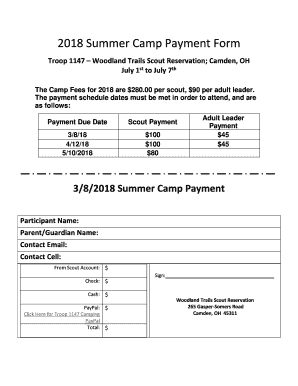
Filling out the 2018 Summer Camp Payment Form for Troop 1147 is a straightforward process that ensures your participation in the upcoming camp. This guide will take you through each section of the form with clear instructions to help you complete it online.
Follow the steps to successfully complete the payment form.
- Click ‘Get Form’ button to access the form and open it in your preferred document editing platform.
- In the participant name field, enter the name of the scout who will be attending the camp.
- Next, fill in the parent or guardian name to ensure proper contact and identification.
- Provide a valid contact email address where you can receive updates regarding the camp.
- Enter a contact cell number for quick communication regarding any camp-related issues.
- Indicate the amount being paid from the scout account, if applicable, in the 'From Scout Account' field.
- Specify the amount you are paying by check in the 'Check' field, if you choose to pay this way.
- Fill in the cash amount, if you are planning to make your payment in cash.
- If you are using PayPal, fill in the amount you wish to pay in the 'PayPal' field.
- Calculate the total amount due based on the chosen payment method and fill it in the 'Total' field.
- Provide your signature in the designated area, indicating your agreement to the payment terms.
- After completing the form, you can save changes, download, print, or share the form as necessary.
Complete your 2018 Summer Camp Payment Form online to ensure a smooth registration process.