Loading
Get Onesys
How it works
-

Open form follow the instructions
-

Easily sign the form with your finger
-

Send filled & signed form or save
How to fill out the Onesys online
Filling out the Onesys online can streamline your application process. This guide offers clear, step-by-step instructions to assist you in accurately completing the dealer/sub dealer application form.
Follow the steps to complete the Onesys application form.
- Click the ‘Get Form’ button to obtain the application form and open it in the designated editor.
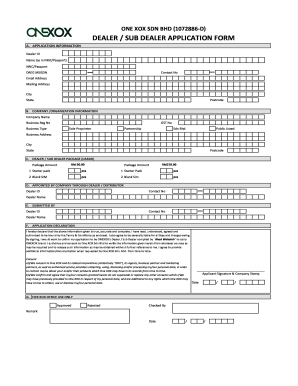
- Begin by filling out the application information section. Provide your dealer ID, name as it appears in your NRIC or passport, and your NRIC or passport number. Additionally, include your DREG MSISDN, contact number, email address, mailing address, city, state, and postcode.
- Proceed to the company or organization information section. Enter your company name, business registration number, GST number, and select your business type from the options provided: sole proprietor, partnership, Sdn Bhd, or public listed. Fill out the business address details including city, state, and postcode.
- In the dealer/sub dealer package section, indicate the desired package by specifying the amount and the quantity of starter packs and blank SIMs you wish to apply for.
- Fill in the details of the dealer or distributor appointing you. Include their dealer ID, contact number, and dealer name.
- Complete the submitted by section, providing the dealer ID, contact number, and dealer name for your submission.
- In the application declaration area, review the declaration statement. By signing, you confirm the information provided is accurate and acknowledge the terms and conditions. Consent to the processing of your personal data as outlined in the form.
- Affix your signature and company stamp in the designated area. Provide the current date.
- For any changes, users can save the filled form, download it for future reference, print it for physical submission, or share it as needed.
Complete your Onesys application online today for a smooth submission experience.