Loading
Get In-service Documentation Form
How it works
-

Open form follow the instructions
-

Easily sign the form with your finger
-

Send filled & signed form or save
How to fill out the IN-SERVICE DOCUMENTATION FORM online
Filling out the IN-SERVICE DOCUMENTATION FORM online is a straightforward process that ensures your compliance with necessary in-service documentation requirements. This guide provides clear instructions for each section of the form to assist users in completing it effectively.
Follow the steps to fill out the IN-SERVICE DOCUMENTATION FORM online.
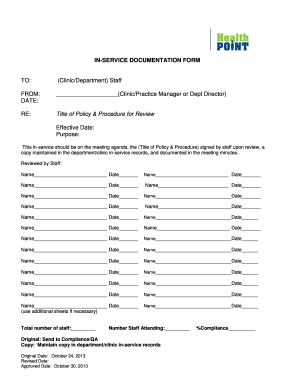
- Click ‘Get Form’ button to obtain the IN-SERVICE DOCUMENTATION FORM and open it in your preferred online editor.
- Begin with the 'TO:' section. Enter the name of the clinic or department that will be receiving this documentation.
- In the 'FROM:' section, input the name of the clinic, practice manager, or department director responsible for this document.
- Fill in the 'DATE:' field with the current date when the form is being completed.
- Next, provide the 'RE:' section with the title of the policy and procedure that is under review.
- In the 'Effective Date:' section, input the date when the policy will take effect.
- State the purpose of the in-service under the 'Purpose:' section. Clearly explain what the session aims to cover.
- Ensure that the in-service is included in the meeting agenda. This section serves as a reminder to all involved parties.
- Document the review process by having each staff member sign in the 'Reviewed by Staff:' section, along with the date they reviewed the policy.
- At the bottom of the form, note the total number of staff and the number of staff attending the in-service.
- Finalize the document by indicating the original date, revised date (if applicable), and the approved date, which reflects the form's compliance tracking.
- Finally, consider saving any changes made to the document, then download, print, or share the IN-SERVICE DOCUMENTATION FORM as required.
Complete your documentation online today to ensure compliance with in-service requirements.