Loading
Get Cr 108
How it works
-

Open form follow the instructions
-

Easily sign the form with your finger
-

Send filled & signed form or save
How to fill out the Cr 108 online
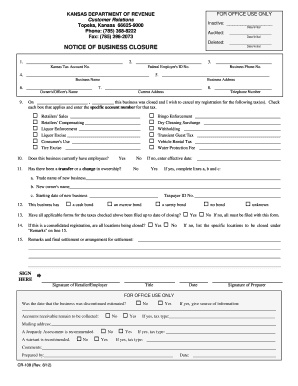
The Cr 108 form is a crucial document for businesses wishing to formally close and cancel their tax registration in Kansas. This guide will assist you through each section of the form, ensuring that you complete it accurately and efficiently.
Follow the steps to successfully complete the Cr 108 form.
- Press the ‘Get Form’ button to download the Cr 108 form and open it in your preferred editor.
- Enter your Kansas Tax Account Number and Federal Employer's ID Number at the top of the form. This information is essential for identifying your business's tax registrations.
- Provide the Business Name and Business Address in the designated areas. Ensure that these details match those on your official business documentation.
- Fill in the Owner's/Officer's Name and Business Phone Number. This ensures that the appropriate person is associated with the closure.
- Indicate the date of business closure. Review this information carefully, as it is important for your records.
- Check the boxes for the specific taxes you wish to cancel and enter the corresponding account numbers. Be thorough to avoid any delays in processing.
- Answer the questions regarding current employees and changes in ownership. If applicable, provide the new business details as required.
- Confirm if all necessary tax forms have been filed up to the date of closure. If not, make sure to list the specific locations being closed under the remarks section.
- Sign the form where indicated, providing both your signature and the title. Additionally, if someone else prepared the form, they must also sign it.
- Once you have reviewed and completed the form, save your changes. You can then download a copy, print it, or share it as necessary.
Complete your Cr 108 form online today to ensure a smooth business closure process.
Withholding Tax KW-5 Deposit Reports can be made using the Kansas Department of Revenue Customer Service Center. After connecting to your Withholding account, simply click the Make an EFT Payment link to complete your filing and payment.