Loading
Get Modulo Dichiarazione Di Responsabilit Inps
How it works
-

Open form follow the instructions
-

Easily sign the form with your finger
-

Send filled & signed form or save
How to fill out the Modulo Dichiarazione Di Responsabilit Inps online
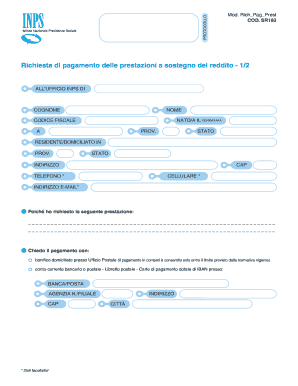
The Modulo Dichiarazione Di Responsabilit Inps is an important document used to request payment for income support services. This guide will provide you with clear, step-by-step instructions on how to effectively fill out this form online, ensuring that you submit accurate and complete information.
Follow the steps to successfully complete the Modulo Dichiarazione Di Responsabilit Inps online.
- Click the ‘Get Form’ button to obtain the Modulo Dichiarazione Di Responsabilit Inps and open it in your chosen digital editor.
- Begin by filling in your last name (Cognome) and first name (Nome) in the designated fields.
- Enter your date of birth (Nato/a il) using the format GG/MM/AAAA.
- Provide your tax code (Codice Fiscale) in the appropriate section.
- Complete the fields indicating your place of residence or domicile, including Province (Prov.), State (Stato), address (Indirizzo), postal code (CAP), telephone (Telefono), mobile phone (Cellulare), and email address (Indirizzo E-Mail). Note that some of these data fields are optional.
- In the section titled 'Poiché ho richiesto la seguente prestazione', clearly state the service you are requesting.
- Select your preferred method of payment by marking the appropriate option: either bank transfer (bonifico domiciliato presso Ufficio Postale) or bank/postal account (conto corrente bancario o postale). Fill in the necessary bank details such as bank name (Banca/Posta), branch agency number (Agenzia N./Filiale), postal code (CAP), and address for where the payment is to be sent.
- If you choose the bank transfer option, the bank official must complete the section below the payment method, including the IBAN code (27 characters) and their signature.
- Complete the declaration indicating that the IBAN provided is in your name (intestato) and is linked to your tax code.
- Sign and date the form at the end, ensuring you are aware of the legal responsibilities associated with providing accurate information.
- Once you have filled out the form, save your changes, and then proceed to download, print, or share the form as needed.
Complete your documents online now for a seamless submission process.
La scadenza per la presentazione, di norma, è fissata per il 28 febbraio di ogni anno. In riferimento al 2021, la presentazione dei modello ha subito una proroga fino al 1 Marzo 2021.