Loading
Get Continuing Education Units Ceus Form Author Unkown Date
How it works
-

Open form follow the instructions
-

Easily sign the form with your finger
-

Send filled & signed form or save
How to fill out the Continuing Education Units CEUs Form online
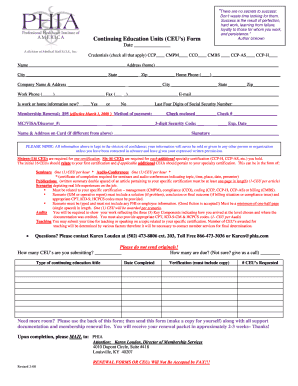
Filling out the Continuing Education Units (CEUs) Form is essential for maintaining your certification and advancing your professional development. This guide will provide you with clear, step-by-step instructions to assist you in completing the form accurately and efficiently online.
Follow the steps to complete the CEUs Form with ease.
- Use the ‘Get Form’ button to access and open the CEUs Form in your digital editor.
- Enter the date in the provided space. This helps in tracking your submission timeline.
- Check all applicable credentials boxes (CCP, CMPM, CCO, CMBS, CCP-AS, and CCP-H) to confirm your qualifications.
- Fill in your personal information including your name, home address, city, state, and zip code.
- Provide your home phone number and, if applicable, your work information including company name, address, city, state, zip code, work phone, and fax number.
- Indicate if your work or home information is new by selecting ‘Yes’ or ‘No’.
- Complete the membership renewal section by entering your payment method and relevant card information where required. Make sure to provide the last four digits of your Social Security number.
- If using a check, include the check number and any required card information with the three-digit security code and expiry date.
- Sign the form, ensuring you understand that your information will be kept confidential.
- List the number of CEUs you are submitting and check how many are due. If you are uncertain, it is advisable to contact member services.
- Provide details for the type of continuing education, completion date, verification requirements, and the number of CEUs requested.
- If needed, use the back of the form for additional space for information.
- After reviewing your completed form, save your changes, then download, print, or share the form as necessary. Make sure to keep a copy for your records.
- Mail the completed form along with any supporting documentation and the membership renewal fee to the specified address.
Complete your documents online now to ensure your education credits are submitted promptly.
The primary purpose of the CEU is to provide a permanent record of the educational accomplishments of an individual who has completed significant non-credit educational and career enhancement experiences.
Industry-leading security and compliance
US Legal Forms protects your data by complying with industry-specific security standards.
-
In businnes since 199725+ years providing professional legal documents.
-
Accredited businessGuarantees that a business meets BBB accreditation standards in the US and Canada.
-
Secured by BraintreeValidated Level 1 PCI DSS compliant payment gateway that accepts most major credit and debit card brands from across the globe.