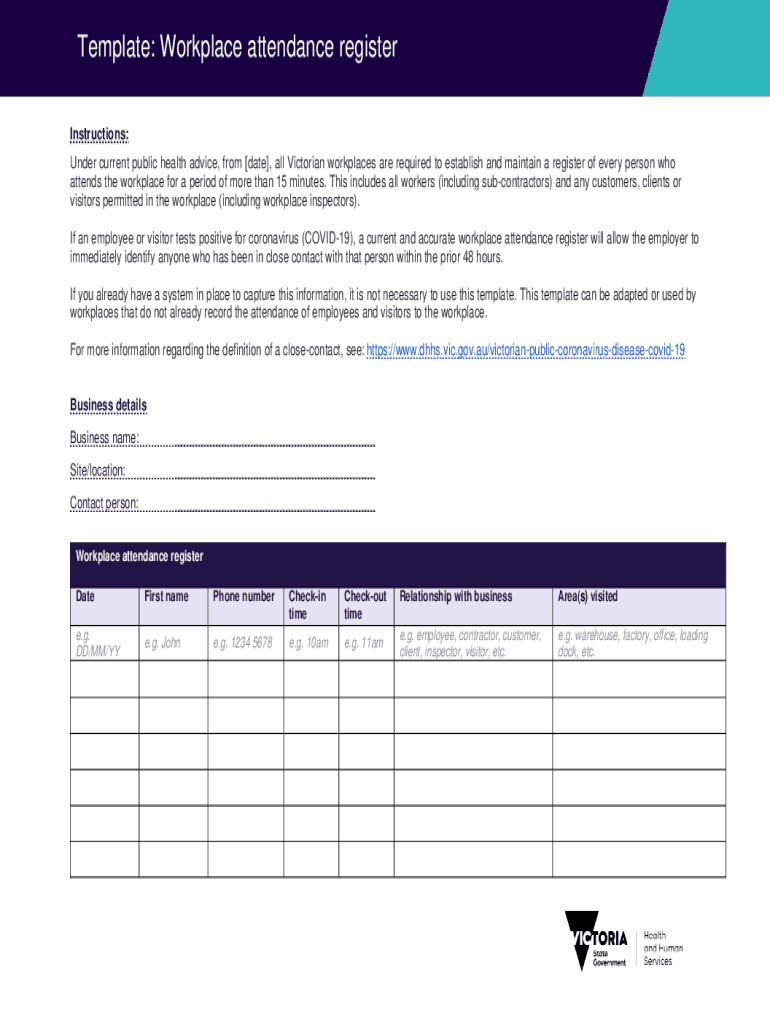
Template: Workplace attendance register Instructions: Under current public health advice, from date , all Victorian workplaces are required to establish and maintain a register of every person who.
Loading

Open form follow the instructions

Easily sign the form with your finger

Send filled & signed form or save
How to fill out the Workplace Attendance Register Pdf online
Filling out the Workplace Attendance Register Pdf is essential for tracking attendance in your workplace. This guide provides clear, step-by-step instructions to help you complete the form accurately and efficiently online.
Follow the steps to fill out your Workplace Attendance Register Pdf effectively.
- Click 'Get Form' button to access the attendance register and open it in your preferred online editor.
- In the business details section, enter your business name in the designated space. This identifies which workplace the register pertains to.
- Next, fill in the site or location of the workplace. This information is crucial for proper identification in case of contact tracing.
- Provide the name and contact details of the designated contact person. This individual will be responsible for managing the register.
- In the main body of the register, you will find sections labeled 'Date,' 'First name,' 'Phone number,' 'Check-in time,' and 'Check-out time.' Complete each field accurately for every individual attending the workplace.
- Specify the relationship of each person to the business in the relevant section, such as employee, contractor, customer, client, inspector, or visitor.
- Indicate the area or areas visited by each person during their time at the workplace, which helps in understanding foot traffic and maintaining safety protocols.
- Once you have completed filling out all the fields for each individual, review the information for accuracy to ensure it is current and correct.
- After final review, you can save your changes. Options for downloading, printing, or sharing the completed form are available to facilitate easy record-keeping.
Complete your Workplace Attendance Register Pdf online today to ensure compliance and enhance workplace safety.
Experience a faster way to fill out and sign forms on the web. Access the most extensive library of templates available.
Related content
... of this letter is to emphasize the seriousness of your attendance record (absenteeism)...
STAFF ATTENDANCE REGISTER 2014. Month: Employee: Position: Arrival. Tea Break. Lunch...
Absenteeism is a habitual pattern of absence from a duty or obligation without good...
Get answers to your most pressing questions about US Legal Forms API.
What is the best way to keep track of employee attendance?
Clockify is the latest free attendance tracker that helps you track work time and employee attendance. See who was present, when, what they worked on, and how long. Start tracking time — It's Free!
How do you write a staff attendance register?
What's an employee attendance sheet? Employee name. Personal details like address, telephone number, employee number, etc. Whether they were present or absent. The time they clocked in and clocked out. Reason for absence or tardiness.
How do you track employee absences?
Days: Divide the team's total unexcused absences in the specified time frame by the total number of employees multiplied by the total workdays in the specified time frame and multiply the result by 100.
How do I keep track of employee attendance in Excel?
Let's look at the steps you need to follow to create a monthly Excel attendance tracking spreadsheet: Open a new Excel spreadsheet and create columns for each date of the month. Create a column for employee names in the left corner. Fill the columns corresponding to weekends and public holidays with color.
How do you monitor time and attendance of employees?
If you are wondering how to track employee time and attendance, here are four ways to do so: Employee time and attendance system. ... Biometric devices. ... Spreadsheets. ... Attendance registers. ... Selecting the right way to track employee time and attendance.
How do I make a work attendance sheet?
Use the steps mentioned below: Step 1: Add Sheets As Per The Number. ... Step 2: Add The Label. ... Step 3: Format The Dates In Each Sheet. ... Step 4: Fix the Attendance Input in the Sheets. ... Step 5: Lock other cells except where attendance has to be filled. ... Step 6: Evaluate the days on which the employees and students were present.
Is there an easy way to track employee attendance?
Clockify is the latest free attendance tracker that helps you track work time and employee attendance. See who was present, when, what they worked on, and how long. Start tracking time — It's Free!
What is the best way to record employee attendance?
As with most tasks today, in order to track and check employee and student attendance, as well as track attendance at events, it's best to turn to software. An attendance tracker will help you easily track presence, as well as sort, group, organize, and analyze this data.
Use professional pre-built templates to fill in and sign documents online faster. Get access to thousands of forms.
If you believe that this page should be taken down, please follow our DMCA take down process here.