Loading
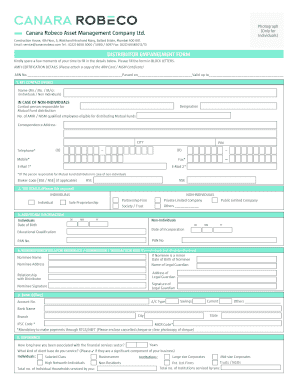
Get Canara Robeco Mf Empanelment Online
How it works
-

Open form follow the instructions
-

Easily sign the form with your finger
-

Send filled & signed form or save
How to fill out the Canara Robeco Mf Empanelment Online
This guide provides a comprehensive walkthrough for users looking to complete the Canara Robeco Mf Empanelment Online form. By following the step-by-step instructions, individuals and entities can ensure that they fill out the form accurately and efficiently.
Follow the steps to successfully complete the empanelment form.
- Click 'Get Form' button to obtain the Canara Robeco Mf Empanelment Online and open it in your preferred editing tool.
- Fill in the AMFI certification details by providing your ARN number, the date passed, and the validity date. Ensure the ARN Card or NISM Certificate is attached.
- In the key contact details section, record the name of the individual or the designation of the contact person responsible for mutual fund distribution. Include the number of AMFI/NISM qualified employees, correspondence address, and provide telephone and email information.
- Choose the tax status by ticking the appropriate box for individuals or non-individuals. Fill in the date of birth for individuals or date of incorporation for non-individuals.
- Complete the nomination details section if applicable, including the nominee's name, address, relationship, and the signature of a legal guardian if the nominee is a minor.
- Provide your bank details, including account type, account number, and bank details such as IFSC and MICR codes as this is essential for payment processing.
- Outline your experience in the financial services sector, including the type of client base you service and the financial products you offer.
- List any business associations with mutual funds, indicating which organizations you are associated with, and their current status.
- Fill in funds mobilized for mutual funds and other instruments, detailing the cumulative amounts to date and for the last year.
- Read and sign the declaration section, confirming the information provided is accurate, and retain a copy for your records.
- Once completed, you can save the changes, download the form, print it, or share it as needed.
Complete your Canara Robeco Mf Empanelment Online today for efficient access to mutual fund distribution opportunities.
Enter the ARN code to be empaneled with TATA Mutual Fund. Provide your PAN, Name, DOB, Email ID & Mobile Number as per your KYD and submit. The above information will be verified with AMFI database against your ARN. Enter the valid OTP sent to your registered Email ID and Mobile Number.
Industry-leading security and compliance
US Legal Forms protects your data by complying with industry-specific security standards.
-
In businnes since 199725+ years providing professional legal documents.
-
Accredited businessGuarantees that a business meets BBB accreditation standards in the US and Canada.
-
Secured by BraintreeValidated Level 1 PCI DSS compliant payment gateway that accepts most major credit and debit card brands from across the globe.