Loading
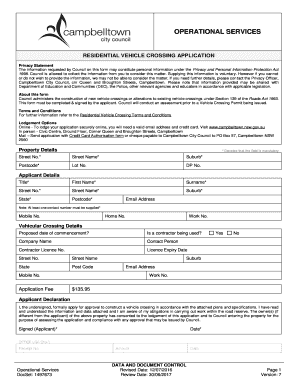
Get Residential Vehicle Crossing Application - Campbelltown Nsw Gov
How it works
-

Open form follow the instructions
-

Easily sign the form with your finger
-

Send filled & signed form or save
How to fill out the Residential Vehicle Crossing Application - Campbelltown Nsw Gov online
Filing a Residential Vehicle Crossing Application is an essential process for constructing or altering vehicle crossings in Campbelltown. This guide provides step-by-step instructions on how to efficiently complete the application form online.
Follow the steps to successfully complete the application.
- Press the ‘Get Form’ button to access the application form online.
- Begin filling out the 'Property Details' section. Ensure to provide mandatory fields marked with an asterisk: Street Number, Street Name, Suburb, and Postcode. If available, add Lot Number and DP Number for precise identification.
- Complete the 'Applicant Details' segment. Fill in your First Name, Surname, and Email Address. Remember that at least one contact number must be provided, selecting from Mobile, Home, or Work numbers.
- In the 'Vehicular Crossing Details' section, indicate the Proposed Date of Commencement for the work. Specify if a contractor will be employed and provide the Contractor's Company Name and Contact Person details. Include the Contractor Licence Number and its Expiry Date.
- Fill in the Street Number and Street Name for the contractor’s location, as well as their Suburb, State, and Postcode.
- Review the Application Fee section. Confirm the fee amount of $135.95.
- Finalize the process by reading the Applicant Declaration thoroughly. Ensure you understand your obligations. Sign and date the declaration to complete your application.
- Once all sections are filled out, you can save changes, download, print, or share the form as needed.
Complete your Residential Vehicle Crossing Application online today to ensure a smooth submission process.
Related links form
Email. Send an email to mail@campbelltown.sa.gov.au with the following details: The old and new address. The assessment number for the property.
Industry-leading security and compliance
US Legal Forms protects your data by complying with industry-specific security standards.
-
In businnes since 199725+ years providing professional legal documents.
-
Accredited businessGuarantees that a business meets BBB accreditation standards in the US and Canada.
-
Secured by BraintreeValidated Level 1 PCI DSS compliant payment gateway that accepts most major credit and debit card brands from across the globe.