Loading
Get New Patient Medical Forms
How it works
-

Open form follow the instructions
-

Easily sign the form with your finger
-

Send filled & signed form or save
How to fill out the New Patient Medical Forms online
Filling out the New Patient Medical Forms online is a straightforward process that ensures your medical history and personal information are accurately captured for your upcoming visit. This guide will walk you through each section, helping you complete the forms efficiently and correctly.
Follow the steps to complete the New Patient Medical Forms online.
- Press the ‘Get Form’ button to access the New Patient Medical Forms and open them in your preferred online editor.
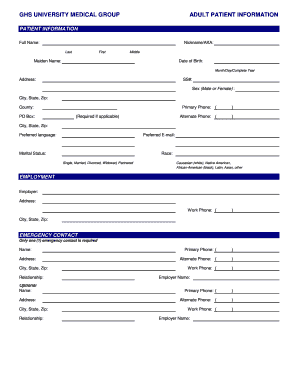
- Begin with the Patient Information section. Fill in your full name, including last, first, middle, and any maiden name if applicable. Enter your date of birth in the required format (Month/Day/Complete Year). Provide your complete address, primary and alternate phone numbers, preferred language, and email.
- Complete the Employment section by entering your employer's name, address, and work phone numbers. If you do not have an employer, this section may be skipped.
- In the Emergency Contact section, input the details for one individual who can be reached in case of an emergency, as well as their relationship to you.
- Proceed to the Billing Information section. Indicate if this visit is the result of an accidental injury and provide the necessary details regarding your guarantor if applicable.
- Enter your Primary Insurance Information, including the insurance company name, ID number, effective date, and your employment status.
- If applicable, provide Secondary Insurance Information following the same structure as the Primary Insurance section.
- Review the Authorization section carefully; read the consent statement and sign as required to authorize medical treatment and the release of information.
- Fill in the Medications, Allergies, and Immunizations section by listing all prescription and non-prescription medications along with their details. Document any allergies you have.
- Complete the Surgical, Social, and Family History section by noting any relevant family medical issues, personal habits, and prior hospitalizations.
- If applicable, complete the Consent for Treatment and other financial policies sections as required.
- Finally, once all sections are completed, save your changes, download the form if necessary, and ensure you print or share it as needed.
Start filling out your New Patient Medical Forms online today to ensure your information is ready for your visit!
The patient's name. The patient's date of birth. The biological gender of the patient. Marital or civil status. The contact information of the patient. Known allergies of the patient. The complete medical history of the patient.