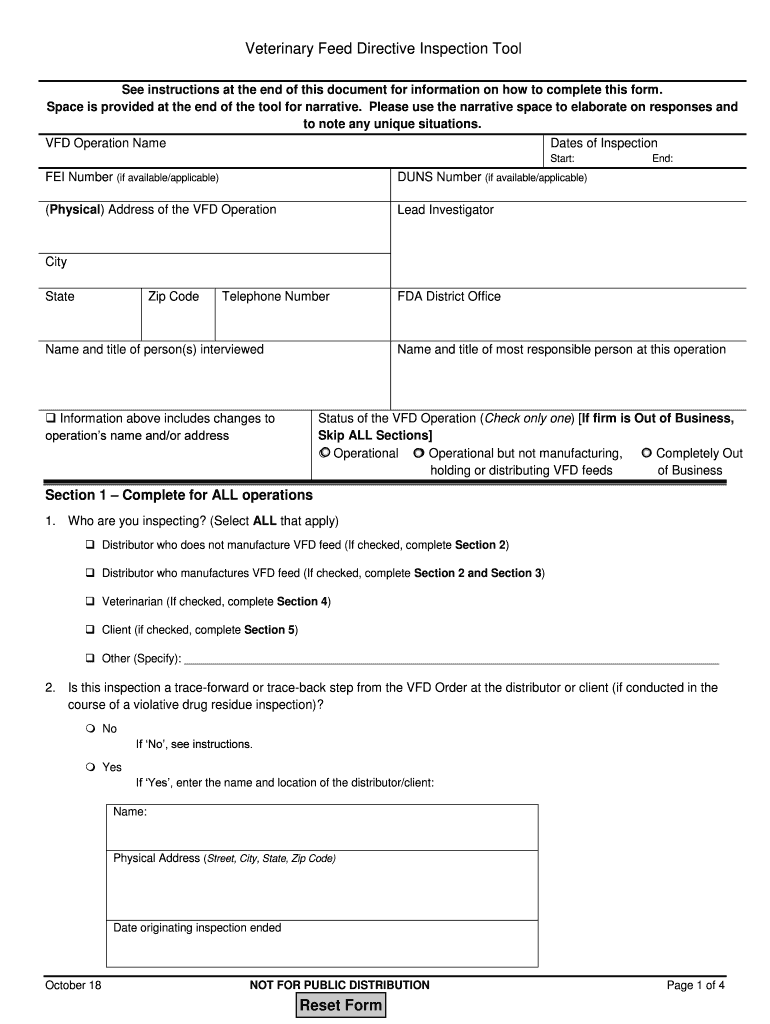
Veterinary Feed Directive Inspection Tool See instructions at the end of this document for information on how to complete this form. Space is provided at the end of the tool for narrative. Please.

Open form follow the instructions

Easily sign the form with your finger

Send filled & signed form or save
How to fill out the GA Veterinary Feed Directive Inspection Tool online
The GA Veterinary Feed Directive Inspection Tool is essential for overseeing VFD operations, ensuring compliance with federal guidelines. This guide provides a detailed, step-by-step approach to accurately complete the inspection tool online, tailored to assist users regardless of their legal experience.
Follow the steps to accurately complete the GA Veterinary Feed Directive Inspection Tool.
- Press the ‘Get Form’ button to access the Veterinary Feed Directive Inspection Tool and open it for editing.
- Begin by filling in the VFD Operation Name, which should reflect the legal name of the individual or business involved in the VFD operations. Include the necessary dates of inspection, specifying both the start and end dates.
- Continue with the FEI Number and DUNS Number, if applicable. Enter the physical address of the VFD operation, ensuring to provide accurate city, state, and zip code information.
- Specify the Lead Investigator's name and enter the telephone number for the operation. Document the names and titles of any individuals interviewed during the inspection, as well as the name and title of the most responsible person at the site.
- Indicate any changes to the operation's name and/or address if applicable. Next, check the operational status of the VFD operation, selecting only one option from operational, operational but not manufacturing, or completely out of business.
- Fill out Section 1 for all operations by selecting who is being inspected, answering the trace-forward or trace-back inspection query, and reviewing up to three VFD orders on hand.
- Complete Section 2 if you are inspecting a distributor. Answer the questions regarding notifications to the FDA and records management concerning VFD feeds.
- If applicable, go to Section 3 to compare formulas, drug inventory records, and labels for three feeds from the VFD orders and verify all relevant details.
- For veterinarians, proceed to Section 4 to confirm active licensure and document medical records related to the VFD order.
- Complete Section 5 if inspecting clients, confirming compliance with VFD order retention and usage requirements.
- At the end of the tool, utilize the narrative space to provide additional explanations or note any unique situations encountered during the inspection.
- Finally, save your changes and proceed to download, print, or share the completed form as necessary.
Ensure compliance and accuracy by completing your GA Veterinary Feed Directive Inspection Tool online today.
Experience a faster way to fill out and sign forms on the web. Access the most extensive library of templates available.
Related content
Veterinary Feed Directive Inspection Tool. October 18. NOT FOR PUBLIC DISTRIBUTION. Page 2...
Mar 16, 2017 — http://www.fooddialogues.com/headlines/hormones-and-growth-tools/...
by N Nickel · 2007 — The directive provides additional discussion regarding the types...
Get answers to your most pressing questions about US Legal Forms API.
What drugs require a VFD?
WHAT PRODUCTS REQUIRE A VFD? Chlortetracycline (, CLTC, Pennchlor) Chlortetracycline + Sulfamethazine (Aureo S 700) Neomycin + Oxytetracycline (Neo-, Neo-Oxy) Oxytetracycline (, Pennox) Tylosin (Tylan) Virginiamycin (V-Max)
What is required on a veterinary feed directive?
the approximate age range of the animals; the approximate weight range of the animals; and. any other information the veterinarian deems appropriate to identify the animals at issue.
What is the final rule of the veterinary feed directive?
The VFD final rule outlines the process for authorizing use of VFD drugs (animal drugs intended for use in or on animal feed that require the supervision of a licensed veterinarian) and provides veterinarians in all states with a framework for authorizing the use of medically important antimicrobials in feed when ...
Why VFDs are used particularly as they relate to animal and human medicine?
The VFD was developed to address the potential for antibiotic resistance in human and animal pathogens that could be related to increased chronic exposure to or indiscreet use of antibiotics in animals. The intent of the VFD is to regulate the use and preserve the efficacy of antibiotics.
How do we determine if a feed product requires a VFD?
The label will say if it is a VFD drug. Only VFD drugs, combination VFD drugs, and feeds containing them will be labeled with: "Caution: Federal law restricts medicated feed containing this veterinary feed directive (VFD) drug to use by or on the order of a licensed veterinarian."
What is VFD regulation and how does it relate to medicated feeds?
The VFD order is essentially a prescription issued by a veterinarian that allows producers to include a medically important antibiotic in feed. This regulation is specific to the feed or water supply containing the VFD drug, not to the type of animal that consumes the feed.
Do all medicated feeds need a VFD?
A VFD is required for all drugs that are considered “medically important antibiotics”, or MIAs. MIAs are the medicine family used in human health. The scientific community is concerned that, over time, continued use of MIAs in food animals will lessen their effectiveness in treating human disease.
What does VFD stand for veterinary?
Veterinary Feed Directive (VFD)
Use professional pre-built templates to fill in and sign documents online faster. Get access to thousands of forms.
If you believe that this page should be taken down, please follow our DMCA take down process here.