Loading
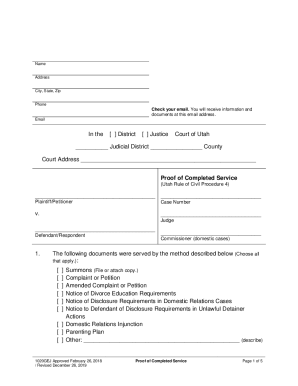
Get Ut 1020gej 2019-2026
How it works
-

Open form follow the instructions
-

Easily sign the form with your finger
-

Send filled & signed form or save
How to fill out the UT 1020GEJ online
The UT 1020GEJ is a crucial document used in Utah’s judicial system to prove that necessary legal documents have been served. This guide will provide you with clear and thorough steps to complete the UT 1020GEJ form online, ensuring that you meet all requirements effectively.
Follow the steps to fill out the UT 1020GEJ online.
- Press the ‘Get Form’ button to access the UT 1020GEJ form and open it in your preferred editor.
- Begin by filling in your name, address, city, state, and zip code at the top of the form. Ensure all details are accurate as this information identifies you in the case.
- Next, locate the section for the case details. Indicate the court type by selecting either 'District' or 'Justice', and complete the judicial district and county fields.
- Provide the case number, the name of the plaintiff or petitioner, and the name of the defendant or respondent. This information connects the service document to the corresponding legal case.
- In the documents served section, select all relevant documents that were served. Common options include the summons, complaint or petition, and any notices applicable to your situation.
- Proceed to detail the method of service. If service was by mail, provide the recipient's details and attach a signed receipt showing proof of delivery.
- If a third person completed the service, they must confirm their eligibility by checking the applicable statements related to their age and state of record.
- Complete the declaration section, including the date and location where the service was made. Ensure the service details are comprehensive and correctly describe how the documents were delivered.
- After completing all relevant sections, review your document for accuracy and completeness. Make any necessary edits.
- Save your changes, and proceed to download, print, or share the completed form as needed.
Complete and file your documents online to ensure a smooth legal process.