Loading
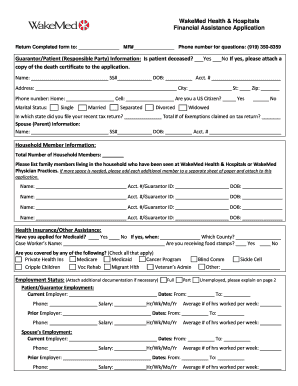
Get Wakemed Financial Assistance
How it works
-

Open form follow the instructions
-

Easily sign the form with your finger
-

Send filled & signed form or save
How to fill out the Wakemed Financial Assistance online
Navigating financial assistance applications can be challenging. This guide provides clear, step-by-step instructions on how to effectively fill out the Wakemed Financial Assistance application online, ensuring you don't miss any critical information.
Follow the steps to complete your financial assistance application:
- Press the ‘Get Form’ button to access the application form and launch it in your chosen editor.
- Begin filling out the Guarantor/Patient Information section. Clearly indicate if the patient is deceased by marking 'Yes' or 'No.' Include the patient's name, social security number, date of birth, account number, address, city, state, and zip code. Provide contact information, including home and cell phone numbers, and answer the citizenship question.
- Next, specify the marital status by selecting one of the options provided. Indicate the state in which you filed your recent tax return and the total number of exemptions claimed.
- Fill in the Spouse (or Parent) Information section if applicable, mirroring the details required in the Guarantor/Patient Information segment.
- Complete the Household Member Information section by listing family members living in your household who have received care at Wakemed Health & Hospitals. If necessary, attach additional pages to this application.
- In the Health Insurance/Other Assistance section, answer whether you have applied for Medicaid and include the details if applicable. Check all applicable health coverage options.
- Fill out the Employment Status information for the patient/guarantor and spouse if applicable. Provide details about current and prior employment, including employers' names, dates of employment, contact information, salaries, and hours worked.
- In the All Other Income section, check all income sources and provide exact amounts where applicable. If unemployed or have no income, explain the situation on the provided lines.
- Detail your assets by itemizing categories such as primary residence, bank accounts, and stocks, along with their values. If needed, attach additional pages for a complete list.
- Next, provide your liabilities, including mortgage balances, credit card debts, and other loans with corresponding amounts and payment figures.
- Complete the Banking Information and Life Insurance Policies sections by providing the name of the bank(s), state, and account numbers, as well as life insurance policy details.
- Certify the information provided by signing and dating the certification section. Ensure that your entries are accurate to the best of your knowledge.
- Lastly, review the checklist for required attachments, ensuring that all supporting documents are included when submitting the application.
- After finalizing your form, you can save changes, download a copy, print it out, or share the completed application as necessary.
Start your application process now by completing the Wakemed Financial Assistance form online.
WakeMed MyChart provides access to portions of your medical information. This includes a summary of your previous visits, lab results and past appointments. In addition, WakeMed Physician Practices patients can communicate directly with your healthcare team with secure messaging through MyChart.