Loading
Get Avs Orlando
How it works
-

Open form follow the instructions
-

Easily sign the form with your finger
-

Send filled & signed form or save
How to use or fill out the Avs Orlando online
Filling out the Avs Orlando form is a streamlined process designed to ensure that all necessary information is submitted accurately. This guide provides step-by-step instructions for completing the form effectively, catering to users of all experience levels.
Follow the steps to successfully complete the form.
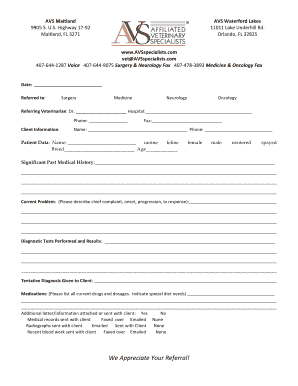
- Press the ‘Get Form’ button to access the online form. This will allow you to view and edit the document as needed.
- Enter the date at the top of the form in the designated space. Ensure the format is clear and easily readable.
- Under the 'Referred to' section, select the appropriate specialty by checking the corresponding box for surgery, medicine, neurology, or oncology.
- Fill in the name of the referring veterinarian, along with their hospital name and phone number. This information helps streamline communication regarding the referred patient.
- Provide client information, including name and phone number. Additionally, fill in the fax number if applicable.
- In the 'Patient Data' section, enter the patient's name, species (canine or feline), breed, and age.
- Specify the patient's gender by selecting the appropriate options: female, male, neutered, or spayed.
- Document any significant past medical history that the patient may have. Use the space provided to describe this in detail.
- Explain the current problem by describing the chief complaint, its onset, progression, and treatment response.
- List any diagnostic tests that have been performed along with their results.
- Indicate the tentative diagnosis given to the client.
- Provide a list of any current medications the patient is taking, including dosages and special dietary needs.
- Mark whether additional information has been attached or sent with the client. Specify details for medical records, radiographs, and recent blood work based on how they have been sent (e.g., faxed, emailed, or sent with the client).
- Once all sections are completed, save your changes. You may then download, print, or share the completed form as necessary.
Complete your documents online today to ensure quick and efficient delivery.
BluePearl began in 1996 as a single practice in Tampa called Florida Veterinary Specialists. The practice thrived, adding new locations in Florida and New York, eventually becoming BluePearl Veterinary partners in 2008.