Loading
Get Wyn-glencross-pressure-care-article-word-doc-waterlow-form.rtf.doc
How it works
-

Open form follow the instructions
-

Easily sign the form with your finger
-

Send filled & signed form or save
How to fill out the Wyn-Glencross-Pressure-Care-Article-word-doc-Waterlow-Form.rtf.doc online
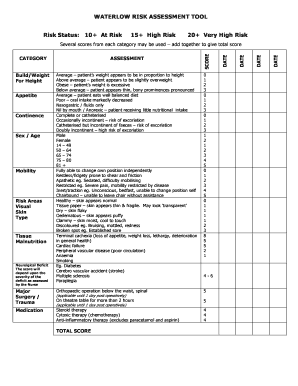
Filling out the Wyn-Glencross Pressure Care Article form is essential for assessing risk in patient care. This guide provides a structured approach to complete the form accurately and efficiently from any online platform.
Follow the steps to complete the online form.
- Press the ‘Get Form’ button to obtain the form and open it in the online editor.
- Begin completing the patient risk status section by assessing the score according to the provided criteria. Choose the appropriate rating based on the patient's weight, nutritional intake, and mobility.
- In the demographics section, input relevant information including sex and age group of the patient. Ensure accuracy as these factors contribute to the risk assessment.
- Evaluate the patient's mobility. Use terms such as fully able, chairbound, or apathetic as applicable, to provide insight into the patient's physical capability.
- Review the skin condition category and select the descriptor that best matches the patient’s skin appearance. Options range from healthy to broken spots.
- Document any significant medical history that may affect the assessment, such as major surgeries or ongoing medication therapies.
- Calculate the total score by adding scores from each applicable category, ensuring to follow the guidelines provided within the form.
- Complete the assessment by entering the date and signing off the evaluation. Review all details for accuracy.
- Finally, save your changes. Depending on your preferences, you can download, print, or share the completed form.
Take action today and fill out your forms online for efficient document management.