Loading
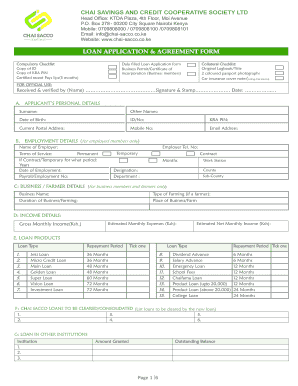
Get Chai Sacco Loan Form 2.cdr
How it works
-

Open form follow the instructions
-

Easily sign the form with your finger
-

Send filled & signed form or save
How to fill out the CHAI SACCO LOAN FORM 2.cdr online
Filling out the CHAI SACCO LOAN FORM 2.cdr online is a crucial step in securing a loan with the CHAI Savings and Credit Cooperative Society. This guide provides a comprehensive walkthrough of each section of the form to ensure that users can complete it accurately and efficiently.
Follow the steps to fill out the CHAI SACCO loan form online.
- Click the ‘Get Form’ button to obtain the form and open it in the online editor.
- Begin by completing the Applicant’s Personal Details section. Enter your surname, other names, date of birth, ID number, KRA PIN, current postal address, mobile number, and email address.
- If you are an employed member, fill out the Employment Details section by providing the name of your employer, terms of service, employer's telephone number, the duration of employment, payroll number, work station, designation, and department.
- For business members or farmers, complete the Business/Farmer Details section with your business name, type of farming, duration of business/farming, and the place of business or farm.
- In the Income Details section, estimate your monthly expenses, gross monthly income, and estimated net monthly income.
- Select the loan products from the provided options. Indicate your preferred loan type, repayment period, and ensure you tick the appropriate durations available.
- List any existing CHAI SACCO loans that need to be cleared or consolidated in the section provided.
- Detail any loans from other institutions, including the institution name, amount granted, outstanding balance, and repayment period.
- Indicate the loan particulars, including the amount you are applying for, the repayment period, and the amount in words.
- Complete the Loan Purpose and Category section by referring to the appendix for classification codes related to various economic sectors and sub-sectors.
- Specify the mode of disbursement, noting that the approved loan amount will be credited to your savings account with CHAI SACCO.
- If applicable, fill in the loan security details, including guarantors' information and collateral details.
- Complete the Borrower's Declaration, ensuring that you confirm the accuracy of the information provided and authorize necessary deductions from your salary.
- After confirming all details are accurate, save your changes, download, print, or share the completed form as necessary.
Complete your CHAI SACCO loan application online today!
The loan is accessed through mobile phone USSD code *645# or *882# M-Chai App or Chai Pesa App. Loan is disbursed through the phone to M-pesa wallet. Interest rate of 6% p.m. charged upfront. Maximum loan repayment period of one month Maximum E-Loan amount is Ksh.