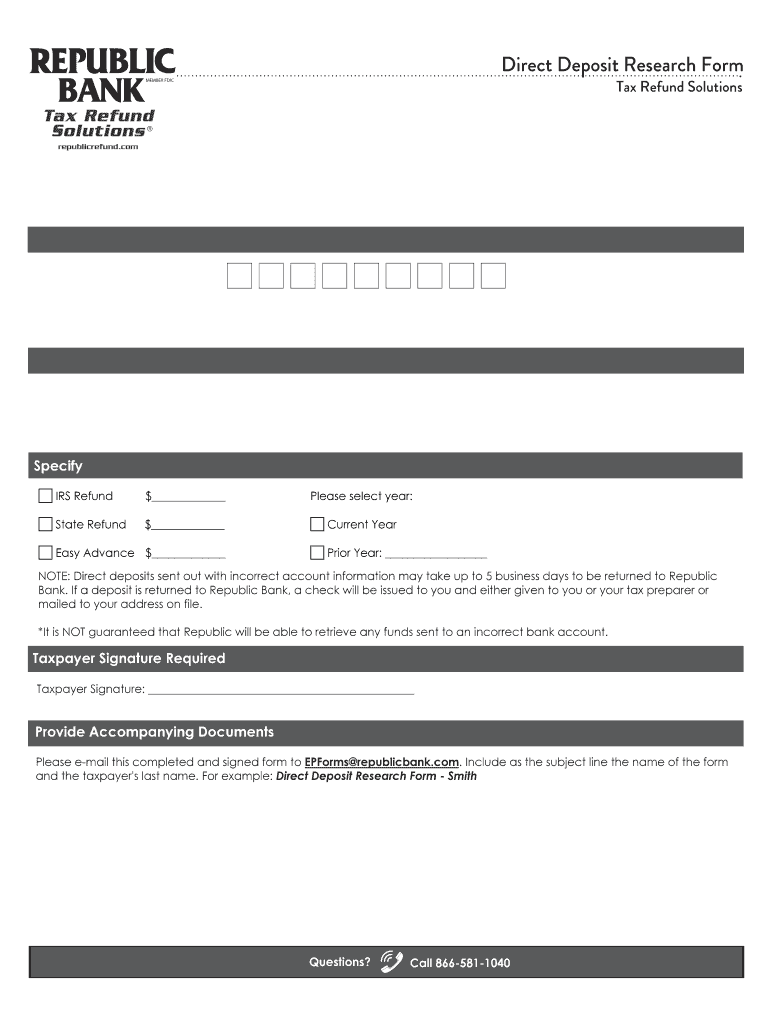
Direct Deposit Research Form Tax Refund SolutionsPLEASE NOTE: You should only use this form if Republic Bank has already sent a deposit to your bank account and the account information is wrong. General.

Open form follow the instructions

Easily sign the form with your finger

Send filled & signed form or save
How to fill out the Direct Deposit Research Form online
Filling out the Direct Deposit Research Form online is an essential step if you believe that Republic Bank has sent a deposit to an incorrect bank account. This guide will walk you through each section of the form to ensure that your information is accurate and complete.
Follow the steps to successfully fill out the Direct Deposit Research Form.
- Click ‘Get Form’ button to access the Direct Deposit Research Form and open it in your preferred editor.
- Enter your taxpayer Social Security number in the designated field to verify your identity.
- Fill in the date when you are submitting the form in the format of month, day, and year.
- Provide your first and last name in the appropriate field to clearly identify yourself.
- Include a callback number where you can be reached for any questions regarding your submission.
- Indicate the issue with your deposit by checking the appropriate box if your bank account is closed or if the deposit information was incorrect.
- Specify the missing deposits by selecting the type of refund and entering the corresponding amount in the space provided.
- Select the year for the refund type by marking the correct option, whether it’s the current year or a prior year.
- Sign the form in the taxpayer signature section to validate your request.
- After completing the form, ensure that all sections are filled accurately, then email the completed form to EPForms@republicbank.com. Use the subject line format: Direct Deposit Research Form - [Your Last Name].
Complete your Direct Deposit Research Form online today for timely assistance.
Experience a faster way to fill out and sign forms on the web. Access the most extensive library of templates available.
Related content
Completing the PDF Form · Read through all pages of the document to find specific...
Dec 15, 2016 — related to Form 1040 and its instructions, such as legislation enacted...
Get answers to your most pressing questions about US Legal Forms API.
How can I get a direct deposit letter from my bank?
In-person: The quickest way to obtain a bank letter is to request one in-person. By doing so, you'll be able to ensure that everything you need is on the letter & be able to make changes if necessary. By phone: Another convenient way to obtain a bank letter is to call your bank's support line.
What counts as proof of direct deposit?
Example of Direct Deposit 1- from a full service payroll company such as ADP, Paycheck, etc. For personnel where the individual is paid through direct deposit the easiest way to show the correct documentation is through a paystub. The paystub shows the routing and bank account number to prove the individual as paid.
How do I get a voided check for direct deposit?
To void a check for direct deposit, you can: Write VOID in big letters across the entire face of the check. Or, write VOID in the: date line. payee line. amount box. amount line. signature line.
Do banks have direct deposit forms?
Get a direct deposit form from your employer. Ask for a written or online direct deposit form. If that isn't available, ask your bank or credit union for one. We've included a list of forms from top banks and credit unions, including the Capital One and Bank of America direct deposit forms.
What form do I need from my bank for direct deposit?
A direct deposit authorization form is a form that employees fill out to authorize their employer to deposit money straight into their bank account. Direct deposit is the standard method most businesses use for paying employees.
What is bank proof for direct deposit?
The payee can provide a picture of the routing and account number from an online log-in and then provide a copy of a recent bank statement that shows their name, address, and the account number. Some banks or credit unions provide account details on paper cards.
How do I get a bank direct deposit form?
Get a direct deposit form from your employer. Ask for a written or online direct deposit form. If that isn't available, ask your bank or credit union for one. We've included a list of forms from top banks and credit unions, including the Capital One and Bank of America direct deposit forms.
What is direct deposit form?
Direct deposit authorization forms authorize employers to send money directly into an individual's bank account. In times past, employers would print out and distribute physical checks on pay day for each employee to deposit into their bank accounts themselves.
Use professional pre-built templates to fill in and sign documents online faster. Get access to thousands of forms.
If you believe that this page should be taken down, please follow our DMCA take down process here.