Loading
Get Temporary Custody Order
How it works
-

Open form follow the instructions
-

Easily sign the form with your finger
-

Send filled & signed form or save
How to fill out the Temporary Custody Order online
Completing a Temporary Custody Order can be an essential task in securing the immediate protection of a child. This guide aims to provide clear and straightforward instructions for filling out the form online, enabling users to navigate the process with confidence.
Follow the steps to complete your Temporary Custody Order online.
- Click ‘Get Form’ button to obtain the Temporary Custody Order and open it in the editor.
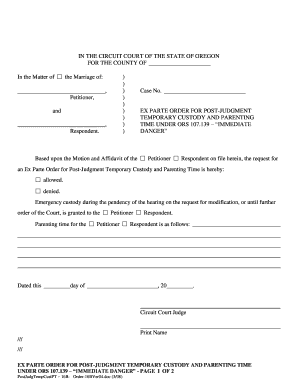
- Begin by entering your name and the name of the other party involved in the case under the section titled 'In the Matter of the Marriage of:'.
- Fill in the case number, which can usually be found on previous court documents related to your custody matter.
- Indicate who is the petitioner and who is the respondent by checking the appropriate box. This helps clarify the roles of the parties involved.
- In the section regarding the request for an Ex Parte Order, check either 'allowed' or 'denied' according to your situation.
- Specify which party is granted emergency custody by selecting either the petitioner or respondent.
- Outline the conditions for parenting time by writing in the details regarding who has parenting time and any specific conditions.
- Fill in the date on which you are submitting the order, ensuring all information is accurate.
- After completing the form, review all entries to ensure accuracy, then save, download, print, or share the form as needed.
Complete your Temporary Custody Order online today to ensure your child's safety and well-being.
Related links form
Temporary custody is often determined during a separation or divorce, pending a final agreement. The court will determine temporary custody based on the best interests of the child. Agreements may start as temporary but may become permanent by a court of law.