Loading
Get Mc210a
How it works
-

Open form follow the instructions
-

Easily sign the form with your finger
-

Send filled & signed form or save
How to fill out the Mc210a online
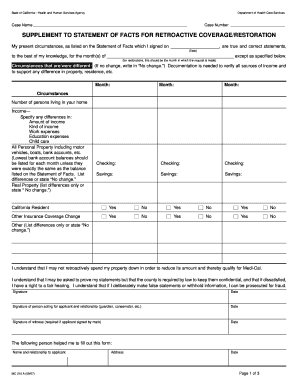
Filling out the Mc210a form online can help streamline your application process for retroactive coverage or restoration of benefits. This guide provides a clear, step-by-step approach to help you accurately complete the form.
Follow the steps to accurately complete the Mc210a form online
- Click ‘Get Form’ button to access the Mc210a form and open it in the designated editor.
- In the 'Case Name' field, enter your full name as it appears in your official records. Ensure correct spelling to avoid processing delays.
- Next, input your 'Case Number'. This number is typically assigned by the Department of Health Care Services and is essential for tracking your case.
- For the statement of facts, confirm the truthfulness of your current circumstances by providing the date you signed the original Statement of Facts.
- Indicate the month(s) for which you are requesting retroactive coverage. If your request pertains to multiple months, list them clearly.
- If there were any changes in your circumstances since the last statement, detail them in the specified area. If there are no changes, simply write 'No change.'
- Fill in the section regarding the number of persons living in your household and specify any variations in your income, including the amount and type, as well as any relevant work or education expenses.
- Document all personal property and financial accounts, clearly noting any differences in balances or confirming 'No change' as applicable.
- For property details, indicate any changes or state 'No change' as needed.
- Answer the questions regarding California residency and other insurance coverage changes by selecting 'Yes' or 'No' as appropriate.
- Finally, ensure that all required signatures are obtained, including your own and any representatives or witnesses, and provide the relevant dates.
- After completing the form, you can save your changes, download, print, or share the document as needed.
Complete your Mc210a form online today to ensure your benefits are processed smoothly.
Redetermination Policies The beneficiary must complete the Annual Redetermination form (MC 210 RV) or other acceptable Medi-Cal Statement of Facts form and provide information on changes in household circumstances and verification of income and/or property.