Loading
Get Qualified Worker Rate Change Form - Publicpartnerships.com
How it works
-

Open form follow the instructions
-

Easily sign the form with your finger
-

Send filled & signed form or save
How to fill out the Qualified Worker Rate Change Form - Publicpartnerships.com online
Filling out the Qualified Worker Rate Change Form is essential for ensuring accurate wage adjustments for Direct Care Workers (DCWs). This guide will provide you with a step-by-step approach to assist you in completing the form online effectively.
Follow the steps to accurately complete the Qualified Worker Rate Change Form.
- Press the ‘Get Form’ button to access the form and open it in your preferred browser.
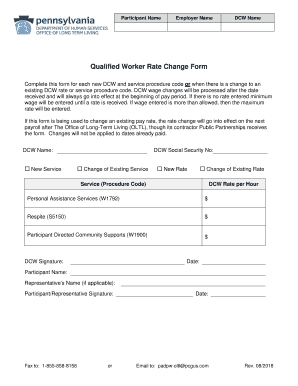
- Begin by entering the participant's name in the designated field. This identifies the person receiving services.
- Next, provide the employer's name in the corresponding field. This refers to the individual or organization responsible for the DCW.
- Enter the name of the Direct Care Worker (DCW) in the appropriate section, specifying whether this is for a new service, a change in existing service, a new rate, or a change of existing rate by checking the relevant box.
- Fill in the DCW’s Social Security Number in the specified field to ensure proper identification.
- Indicate the service type by inserting the procedure code and the corresponding DCW rate per hour in the fields provided for each service, such as Personal Assistance Services, Respite, and Participant Directed Community Supports.
- Obtain the signature of the DCW in the designated area along with the date of signing.
- If applicable, include the participant's name and the representative's name, if one is involved, along with their signatures.
- Finally, choose to either fax the completed form to 1-855-858-8158 or email it to padpw-oltl@pcgus.com. Ensure that the date of submission is included.
Take the next step in managing your documents by completing the Qualified Worker Rate Change Form online today.