Loading
Get Tropic-winds-repair-formpdf
How it works
-

Open form follow the instructions
-

Easily sign the form with your finger
-

Send filled & signed form or save
How to fill out the Tropic-Winds-Repair-Formpdf online
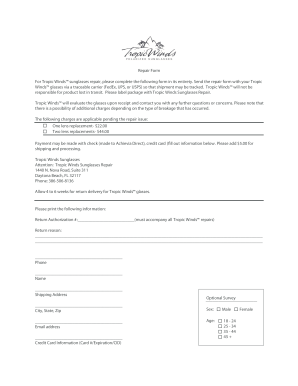
In this guide, we will provide you with detailed instructions on how to efficiently complete the Tropic-Winds-Repair-Formpdf online. This form is essential for users needing repair services for their Tropic Winds™ sunglasses.
Follow the steps to fill out the form accurately.
- Click the ‘Get Form’ button to access the Tropic-Winds-Repair-Formpdf and open it in your preferred online editor.
- In the form, begin by filling out the Return Authorization number. This number must accompany all repairs, so ensure this is accurate.
- Identify and clearly state the return reason in the designated section. Provide as much detail as possible about the issue you're experiencing with your sunglasses.
- Enter your phone number into the appropriate field to allow for communication regarding the repair process.
- Provide your full name as it appears on your identification or any associated documents.
- Fill in your shipping address completely, including the city, state, and zip code, to ensure proper return delivery.
- Include your email address for updates and notifications regarding the status of your repair.
- Input your credit card information, including card number, expiration date, and CID, to facilitate payment for the repair services.
- Complete the optional survey section, if desired, by indicating your sex and age.
- Once all sections of the form are filled out correctly, save your changes. You can then proceed to download, print, or share the form as needed.
Start filling out the Tropic-Winds-Repair-Formpdf online today to ensure your sunglasses are repaired swiftly!