Loading
Get Personnel Records Forms For 2014 Manpower Budget - Circular - Ohcsf Gov
How it works
-

Open form follow the instructions
-

Easily sign the form with your finger
-

Send filled & signed form or save
How to fill out the Personnel Records Forms For 2014 Manpower Budget - Circular - Ohcsf Gov online
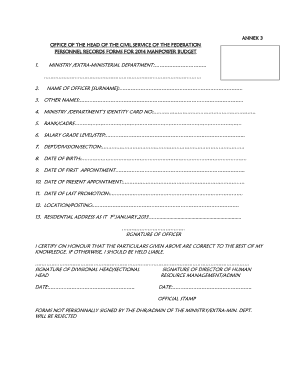
This guide provides users with a clear and concise walkthrough for completing the Personnel Records Forms for the 2014 Manpower Budget. Using a structured approach, users can efficiently fill out the necessary details required for personnel record management.
Follow the steps to fill out the form accurately and effectively.
- Click the ‘Get Form’ button to access the form and open it in your preferred online editing tool.
- Begin filling out Section 1 by entering the ministry or extra-ministerial department name. Ensure the name reflects the official designation.
- In Section 2, provide the surname of the officer accurately, ensuring correct spelling as it will be used for official records.
- Continue to Section 3 to list any other names the officer may use, including middle names or aliases.
- In Section 4, input the ministry or department's identity card number, ensuring it matches official records for verification.
- Complete Section 5 by entering the rank or cadre of the officer as recognized in the ministry's hierarchy.
- In Section 6, state the salary grade level and step of the officer, reflecting the proper compensation categorization.
- Fill out Section 7 with the department, division, or section to which the officer is assigned, maintaining clarity in departmental structure.
- Enter the officer's date of birth in Section 8 in the correct format to ensure consistency and accuracy in records.
- For Section 9, provide the date of the officer's first appointment, which should align with documented employment history.
- In Section 10, specify the date of the present appointment, indicating the start date for the current position.
- Input the date of the last promotion in Section 11, ensuring all details are recorded for tracking career progression.
- Enter the location or posting of the officer in Section 12, indicating where they are currently situated.
- In Section 13, provide the residential address of the officer as of January 1, 2013, which may be relevant for record-keeping.
- Conclude by signing the form in the designated area, certifying that all information provided is accurate to the best of your knowledge.
- Ensure Section for the divisional head and director signatures are completed, along with the date and official stamp, to authenticate the form.
- Finally, save your changes, download a copy for your records, print the document if necessary, or share it with the appropriate office.
Complete the Personnel Records Forms online today to ensure efficient personnel management.
Industry-leading security and compliance
US Legal Forms protects your data by complying with industry-specific security standards.
-
In businnes since 199725+ years providing professional legal documents.
-
Accredited businessGuarantees that a business meets BBB accreditation standards in the US and Canada.
-
Secured by BraintreeValidated Level 1 PCI DSS compliant payment gateway that accepts most major credit and debit card brands from across the globe.