Loading
Get Genuine Redundancy Account Claim Form - Incolink
How it works
-

Open form follow the instructions
-

Easily sign the form with your finger
-

Send filled & signed form or save
How to fill out the Genuine Redundancy Account Claim Form - Incolink online
Filling out the Genuine Redundancy Account Claim Form - Incolink is a straightforward process that requires careful attention to detail. This guide will help you navigate each section of the form smoothly, ensuring you provide the necessary information for your claim.
Follow the steps to successfully complete your claim form.
- Use the 'Get Form' button to access the Genuine Redundancy Account Claim Form and open it in your preferred editor.
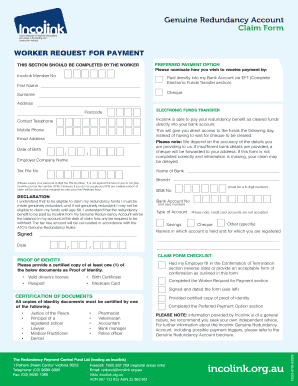
- Complete the 'Worker Request for Payment' section, which includes entering your Incolink Member Number, preferred payment option (either via Electronic Funds Transfer or cheque), first name, surname, address, postcode, contact telephone, mobile phone, email address, date of birth, employer company name, and tax file number. Ensure that all information provided is accurate to prevent delays.
- If you choose Electronic Funds Transfer, fill out the bank details section. Provide the name of the bank, BSB number (a 6-digit number), bank account number (not the card number), and specify the type of account (savings, cheque, or other). Remember, credit card accounts are not accepted.
- Read and sign the declaration stating your understanding of the eligibility criteria for claiming redundancy funds. Ensure that you date your signature.
- Provide proof of identity by submitting a certified copy of at least one acceptable document, such as a valid driver's license, birth certificate, passport, or Medicare card.
- Check that all parts of the form are completed, including the 'Preferred Payment Option' section, and ensure that your employer has filled in the 'Confirmation of Termination' section on the reverse side or provided an acceptable confirmation of termination.
- Once all information is accurately entered and verified, you can save changes, download, print, or share the completed form according to your needs.
Complete your Genuine Redundancy Account Claim Form online today for a smooth submission process.
Incolink is the safety net for your physical and mental health. Wellbeing & Support services are exclusive to workers in the construction industry as part of your membership. Read more.
Industry-leading security and compliance
US Legal Forms protects your data by complying with industry-specific security standards.
-
In businnes since 199725+ years providing professional legal documents.
-
Accredited businessGuarantees that a business meets BBB accreditation standards in the US and Canada.
-
Secured by BraintreeValidated Level 1 PCI DSS compliant payment gateway that accepts most major credit and debit card brands from across the globe.