Loading
Get Assignment Of Judgment
How it works
-

Open form follow the instructions
-

Easily sign the form with your finger
-

Send filled & signed form or save
How to fill out the Assignment Of Judgment online
Completing the Assignment Of Judgment is an essential step for transferring the rights to a judgment in a legal case. This guide provides clear, step-by-step instructions to help you navigate the process online, ensuring accuracy and compliance with legal requirements.
Follow the steps to complete the Assignment Of Judgment effectively.
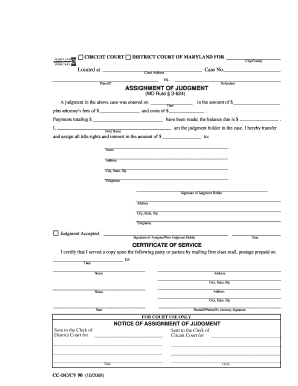
- Click ‘Get Form’ button to obtain the form and open it in the editor.
- Begin by entering the case identification details at the top of the form. Fill in the 'Case No.', 'Court Address', and the specific 'City/County' where the court is located.
- In the section dated 'A judgment in the above case was entered on', input the date judgment was issued. Additionally, include the amounts for attorney's fees and costs where indicated.
- List total payments made in the specified fields, ensuring to provide an accurate figure for the ‘Payments totaling’ section to reflect any payments already made.
- Enter the balance due in the designated field, representing the total amount that must still be paid.
- Provide your full name as the judgment holder in the corresponding field, ensuring your name is printed clearly.
- Indicate the total amount you are transferring in the appropriate section, reflecting the rights being assigned in this judgment.
- Fill in the information of the new judgment holder (assignee), including their name, address, city, state, zip, and telephone number.
- Sign the form as the judgment holder, providing your address and contact information again for verification.
- The new judgment holder must sign to accept the assignment of judgment, followed by dating this section to validate the agreement.
- Complete the 'Certificate of Service' by certifying that a copy was sent to the relevant parties through first-class mail, including the date of mailing and address of each party.
- Finally, for court use only, check off the relevant boxes and provide the necessary information to notify the Clerks of both District and Circuit Courts.
- Once all sections are completed, review all details for accuracy. Save the changes made, and download or print the form as required for your records or submission.
Take action today by completing your Assignment Of Judgment online to ensure a smooth transfer of interests.
In law, a judgment, also spelled judgement, is a decision of a court regarding the rights and liabilities of parties in a legal action or proceeding. Judgments also generally provide the court's explanation of why it has chosen to make a particular court order.