Loading
Form preview
  • US Legal Forms
  • Other Templates
  • More Forms
  • More Multi-State Forms
  • Myoptumhealthphysicalhealth

Get Myoptumhealthphysicalhealth

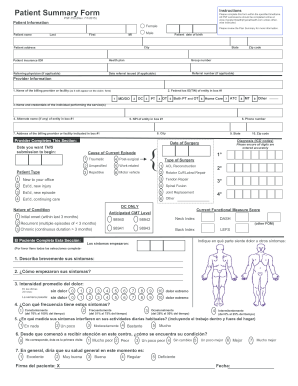
Patient Summary Form Instructions Please complete this form within the specified timeframe. All PSF submissions should be completed online at www.myoptumhealthphysicalhealth.com unless otherwise instructed.

How it works

  1. Open form

    Open form follow the instructions

  2. Easily sign form

    Easily sign the form with your finger

  3. Share form

    Send filled & signed form or save

How to fill out the Myoptumhealthphysicalhealth online

Completing the Myoptumhealthphysicalhealth online form is an essential step in managing your healthcare efficiently. This guide provides clear and concise instructions to help users accurately fill out each section of the form, ensuring all necessary information is submitted correctly.

Follow the steps to successfully complete the form online.

  1. Click the ‘Get Form’ button to acquire the Myoptumhealthphysicalhealth form and access it in the provided online editor.
  2. Begin by entering your personal information in the 'Patient Information' section. Fill in your first name, last name, middle initial, date of birth, address, city, state, zip code, insurance ID, health plan, referring physician's name (if applicable), date referral was issued (if applicable), and group number.
  3. Next, move to the 'Provider Information' section. Here, you need to provide the name of the billing provider or facility, the federal tax ID of the entity, and the NPI number if available. Include the alternative name of the entity, address, and phone number as requested.
  4. Indicate the cause of the current episode by selecting an appropriate option such as 'Traumatic', 'Post-surgical', or 'Work related'. Specify the diagnosis using the provided ICD codes.
  5. In the section titled 'Functional Measure Score', input your current functional status by filling out the details regarding pain levels over the past 24 hours and the previous week, along with the frequency of these symptoms.
  6. Complete the final section by reviewing all the data entered for accuracy. Once satisfied, you can save your changes, download the document, print it out, or share it if necessary.

Take control of your health by filling out the Myoptumhealthphysicalhealth form online today!

Get form

Experience a faster way to fill out and sign forms on the web. Access the most extensive library of templates available.
Get form

Related content

Disabilities of the Arm, Shoulder and Hand (DASH)
by NOTAT ALL — The following questions relate to the impact of your arm, shoulder or...
Learn more

Related links form

CA Uniform Statutory Form Power Of Attorney 2013 ME PA-030 2020 NM NMERB Release Of Claims To Community Property 2022 IL Request For Tow Hearing - City Of Evanston 2013

Questions & Answers

Get answers to your most pressing questions about US Legal Forms API.

Contact support

UnitedHealth Group earns revenue from premiums, fees, sales, and investments. The company divides its operations into UnitedHealthcare, its benefits branch, and Optum, which is further divided into subcategories for OptumRx, OptumInsight, and OptumHealth.

Optum, a part of UnitedHealth Group, is a pharmacy benefit manager and care services group operating across 150 countries in North America, South America, Europe, Asia Pacific and the Middle East.

Optum is a health information technology and services firm that is part of UnitedHealth Group. It provides technological, operational and consulting solutions and services to individuals, healthcare organizations, pharmaceutical companies as well as the federal and state governments.

Enrolling in Optum Pay will help you take control of your claims payment and remittance data. With innovative tools that allow you to streamline payments and reconcile claims, your practice can run more efficiently.

Faster claims and reduced costsOptum Pay is an advanced payment solution that reduces costs, brings efficiencies and modernizes outdated methods.

ACN Group of California Inc., is an insurance provider. The Company provides chiropractic and acupuncture health care services plan.

As the information technology and services arm of UnitedHealth Group, Optum offers population health management, pharmacy benefit management, analytics, consulting and other services to care providers, health plans, government entities and life sciences companies through its OptumRx, OptumInsight and OptumHealth ...

Optum applies market-leading information, data analytics, technology and clinical insights, to help improve overall health system performance. ... This business makes health care more affordable by helping people find the medications they need at the lowest price, while helping benefit sponsors pay the lowest net cost.

Optum is a leading health services and innovation company focused on improving affordability, quality and efficiency of care. Optum has been operating in India since 2006 and has teams supporting healthcare operations, product development, automation, analytics and data solutions.

Optum Pay is offering a free trial of the new Optum Pay premium features until Feb. 28, 2021.

Get This Form Now!

Use professional pre-built templates to fill in and sign documents online faster. Get access to thousands of forms.
Get form
If you believe that this page should be taken down, please follow our DMCA take down processhere.
Get Myoptumhealthphysicalhealth
Get form
  • Adoption
  • Bankruptcy
  • Contractors
  • Divorce
  • Home Sales
  • Employment
  • Identity Theft
  • Incorporation
  • Landlord Tenant
  • Living Trust
  • Name Change
  • Personal Planning
  • Small Business
  • Wills & Estates
  • Packages A-Z
  • Affidavits
  • Bankruptcy
  • Bill of Sale
  • Corporate - LLC
  • Divorce
  • Employment
  • Identity Theft
  • Internet Technology
  • Landlord Tenant
  • Living Wills
  • Name Change
  • Power of Attorney
  • Real Estate
  • Small Estates
  • Wills
  • All Forms
  • Forms A-Z
  • Other Templates
  • Legal Hub
  • About Us
  • Help Portal
  • Legal Resources
  • Blog
  • Affiliates
  • Contact Us
  • Delete My Account
  • Site Map
  • Industries
  • Forms in Spanish
  • Localized Forms
  • State-specific Forms
  • Forms Kit
  • Real Estate Handbook
  • All Guides
  • Notarize
  • Incorporation services
  • For Consumers
  • For Small Business
  • For Attorneys
  • USLegal
  • FormsPass
  • pdfFiller
  • signNow
  • altaFlow
  • DocHub
  • Instapage
Form Packages
  • Adoption
  • Bankruptcy
  • Contractors
  • Divorce
  • Home Sales
  • Employment
  • Identity Theft
  • Incorporation
  • Landlord Tenant
  • Living Trust
  • Name Change
  • Personal Planning
  • Small Business
  • Wills & Estates
  • Packages A-Z
Form Categories
  • Affidavits
  • Bankruptcy
  • Bill of Sale
  • Corporate - LLC
  • Divorce
  • Employment
  • Identity Theft
  • Internet Technology
  • Landlord Tenant
  • Living Wills
  • Name Change
  • Power of Attorney
  • Real Estate
  • Small Estates
  • Wills
  • All Forms
  • Forms A-Z
  • Other Templates
Customer Service
  • Legal Hub
  • About Us
  • Help Portal
  • Legal Resources
  • Blog
  • Affiliates
  • Contact Us
  • Delete My Account
  • Site Map
  • Industries
  • Forms in Spanish
  • Localized Forms
  • State-specific Forms
  • Forms Kit
Legal Guides
  • Real Estate Handbook
  • All Guides
Prepared for you
  • Notarize
  • Incorporation services
Our Customers
  • For Consumers
  • For Small Business
  • For Attorneys
Our Sites
  • USLegal
  • FormsPass
  • pdfFiller
  • signNow
  • altaFlow
  • DocHub
  • Instapage
Social Media
Call us now toll free:
+1 833 426 79 33
As seen in:
© Copyright 1999-2026 airSlate Legal Forms, Inc. 17 Station Street, Ste. 203, Brookline, MA 02445
  • Your Privacy Choices
  • Terms of Service
  • Privacy Notice
  • Content Takedown Policy
  • Bug Bounty Program