Loading
Get Form B121
How it works
-

Open form follow the instructions
-

Easily sign the form with your finger
-

Send filled & signed form or save
How to fill out the Form B121 online
Filling out the Form B121 Statement of Social Security is an essential step in protecting personal information during the bankruptcy process. This guide aims to provide clear and comprehensive instructions for users to complete the form accurately online.
Follow the steps to fill out the Form B121 online effectively.
- Click ‘Get Form’ button to obtain the form and open it in the editor.
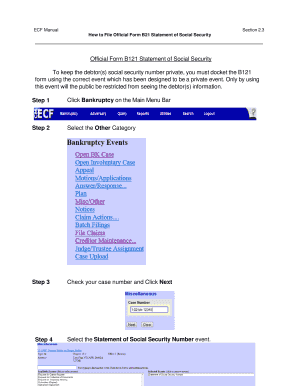
- Navigate to the Main Menu Bar and select Bankruptcy to start the filing process.
- Confirm your case number is correct and then press Next to proceed.
- From the available options, choose the Statement of Social Security Number event.
- On the Joint Filing with Other Attorney screen, click Next to continue.
- Select your client from the provided list and press Next.
- Browse your files to attach the completed B121 Statement of Social Security Number and click Next.
- Review the docket text presented and accept it by clicking Next.
- Conduct a final review of the docket text, then click Next to complete the process.
- After completing the previous steps, you will receive a docket number for the document, which will remain confidential from public view.
Complete your Form B121 online today to ensure your information is protected.
Use this form to tell the court about any Social Security or federal Individual Taxpayer Identification numbers you have used.
Industry-leading security and compliance
US Legal Forms protects your data by complying with industry-specific security standards.
-
In businnes since 199725+ years providing professional legal documents.
-
Accredited businessGuarantees that a business meets BBB accreditation standards in the US and Canada.
-
Secured by BraintreeValidated Level 1 PCI DSS compliant payment gateway that accepts most major credit and debit card brands from across the globe.