Loading
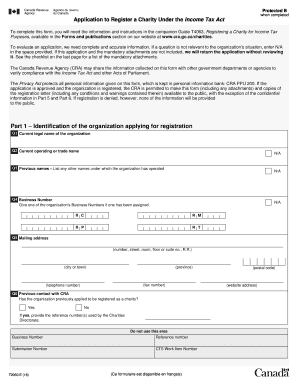
Get Form T2050 Fillable
How it works
-

Open form follow the instructions
-

Easily sign the form with your finger
-

Send filled & signed form or save
How to use or fill out the Form T2050 Fillable online
Filling out Form T2050 is an essential step in registering a charity under the Income Tax Act. This guide will provide you with comprehensive, step-by-step instructions to help you complete the form accurately and efficiently online.
Follow the steps to successfully complete Form T2050 fillable online.
- Click ‘Get Form’ button to access the form and open it in your preferred editor.
- In Part 1, provide identification details of the organization applying for registration. This section includes the organization's current legal name, operating name, Business Number (if any), and mailing address. Be sure to fill out each field accurately.
- Continue to Part 2, where you need to describe the organizational structure. Answer questions regarding internal divisions and governing documents, noting if applicable documents are attached.
- In Part 3, outline the activities of the organization. Describe the charitable purposes and associated activities in detail. Use the provided examples as a guide to ensure clarity.
- Fill out Part 4, which focuses on financial information. Provide a proposed budget alongside the anticipated sources of revenue and expenditures. Attach financial statements if the organization has been operating for over a year.
- In Part 5, list information about all board members and officials of the organization. Ensure accuracy, as this information is crucial for compliance.
- Part 6 requires the physical location of the organization and where records are kept. Input the necessary addresses and contact information.
- Finally, complete Part 7 by certifying that all information is accurate and attaching any required documentation. Make sure two directors sign the form before submission.
- Once you have reviewed and completed the form, you can save changes, download it, print, or share the completed form as needed.
Take the next step and start filling out Form T2050 online today!
Is there a fee to become registered? No. However, if a charity is applying for re-registration after its registration has been revoked for non-filing, it must include a late-filing payment of $500 with the application form.