Loading
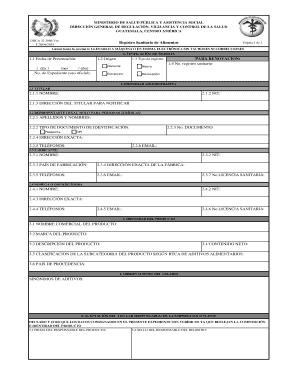
Get Drca 32 2006 Version 9
How it works
-

Open form follow the instructions
-

Easily sign the form with your finger
-

Send filled & signed form or save
How to fill out the Drca 32 2006 Version 9 online
Filling out the Drca 32 2006 Version 9 form is essential for registering food products in Guatemala. This guide provides clear, step-by-step instructions to ensure you complete the form accurately and efficiently, whether using a machine or electronic format.
Follow the steps to successfully complete your Drca 32 2006 Version 9 form.
- Press the ‘Get Form’ button to access the Drca 32 2006 Version 9 form online. This initiates the process of completing your registration.
- Proceed to section 2, and fill out the identity administrative details. Start with the holder’s information, including their name, tax identification number (NIT), and notification address.
- For section 2.3, provide the manufacturer's information, including their name, NIT, country of manufacture, complete factory address, contact numbers, email, and health license number where applicable.
- Move to section 3 and detail the product identity. Enter the commercial name, brand, description, net content, classification according to food additives standards, and country of origin.
- In section 4, if there are any comments or additional observations about the product, record them here. Make sure to note any synonyms for additives if applicable.
- Section 5 requires the acceptance of responsibility. Ensure the responsible person’s signature, seal, and legal acknowledgment are appropriately filled out.
- Finally, in section 6, provide the requisite accompanying documents based on whether it is a new registration or a renewal. Include the corresponding folio numbers for each document presented.
- Once all sections are completed, review your entries for accuracy and completeness. Then proceed to save your changes, download, print, or share the completed form as required.
Complete your Drca 32 2006 Version 9 form online today for a seamless registration process!