Loading
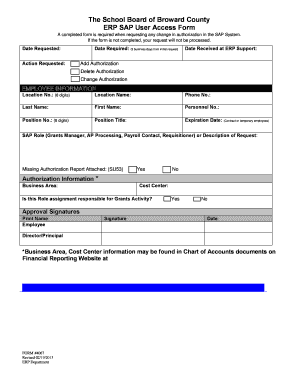
Get The School Board Of Broward County Erp Sap User Access Form ... - Broward K12 Fl
How it works
-

Open form follow the instructions
-

Easily sign the form with your finger
-

Send filled & signed form or save
How to fill out the The School Board Of Broward County ERP SAP User Access Form online
Filling out the The School Board Of Broward County ERP SAP User Access Form is an important step when requesting changes to your access within the SAP system. This guide will provide you with clear instructions on how to complete each section of the form to ensure your request is processed efficiently.
Follow the steps to complete your ERP SAP user access form.
- Click the ‘Get Form’ button to obtain the form and open it electronically.
- In the 'Date Requested' field, enter the current date. This indicates when you are submitting your request.
- In the 'Action Requested' section, select the appropriate option based on your needs: Add Authorization, Delete Authorization, or Change Authorization.
- For the 'Date Required' field, specify the date you need the authorization processed by, allowing three business days from the date requested.
- Fill in 'Location No.' with the relevant 8-digit number associated with your location.
- Provide the 'Location Name' for further identification.
- Enter your 'Phone No.' for contact purposes.
- In the 'Last Name' and 'First Name' fields, enter your full name as it appears in your records.
- Input your 'Personnel No.' to uniquely identify your employment record.
- Enter your 'Position No.', which should also be an 8-digit code.
- Provide your 'Position Title' to clarify your role within the organization.
- If applicable, fill in the 'Expiration Date' for contract or temporary employees to indicate when the authorization will end.
- Specify your SAP role (e.g., Grants Manager, AP Processing) or provide a description of your request in the designated section.
- Indicate whether a Missing Authorization Report (SU53) is attached by marking 'Yes' or 'No.'
- Complete the 'Business Area' and 'Cost Center' information as needed by referencing relevant documents.
- Confirm if the role assignment is responsible for Grants Activity by selecting 'Yes' or 'No.'
- Gather approval signatures from yourself and your Director or Principal as required. Remember to print their names and obtain actual signatures.
- Once all fields are completed, email the finished form to the designated ERP Security Mailbox as instructed.
- For your records, make sure to save changes, download, or print the form if necessary before submitting.
Complete your The School Board Of Broward County ERP SAP User Access Form online today to ensure timely processing of your request.
Call the Special Investigative Unit (School Police) for BCPS at 754-321-0725....Report Educator Misconduct if you know, or someone tells you about: Obscene language. Drug and alcohol use. Disparaging comments. Prejudice or bigotry. Sexual innuendo. Cheating. Testing violations. Physical aggression.
Industry-leading security and compliance
US Legal Forms protects your data by complying with industry-specific security standards.
-
In businnes since 199725+ years providing professional legal documents.
-
Accredited businessGuarantees that a business meets BBB accreditation standards in the US and Canada.
-
Secured by BraintreeValidated Level 1 PCI DSS compliant payment gateway that accepts most major credit and debit card brands from across the globe.