Loading
Form preview
  • US Legal Forms
  • Form Library
  • Industry Forms
  • Industry Shipping Forms
  • Ups Commercial Invoice 2006

Get Ups Commercial Invoice 2006-2026

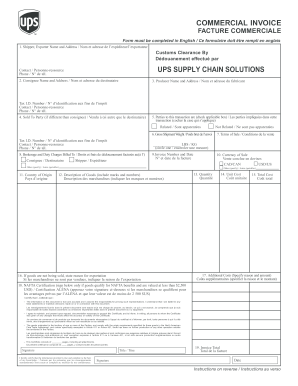
Ortateur Customs Clearance By Dédouanement effectué par UPS SUPPLY CHAIN SOLUTIONS Contact / Personne-ressource Phone / N° de tél. 2. Consignee Name and Address / Nom et adresse du destinataire 3. Producer Name and Address / Nom et adresse du fabricant Tax I.D. Number / N° d’identification aux fins de l’impôt Contact / Personne-ressource Phone / N° de tél. 4. Sold To Party (if different than consignee) / Vendu à (si autre que le destinataire) 5. Parties to this transaction are.

How it works

  1. Open form

    Open form follow the instructions

  2. Easily sign form

    Easily sign the form with your finger

  3. Share form

    Send filled & signed form or save

How to fill out the UPS Commercial Invoice online

Filling out the UPS Commercial Invoice accurately is essential for international shipments. This guide provides clear and step-by-step instructions on how to complete each section of the UPS Commercial Invoice form online.

Follow the steps to accurately fill out your UPS Commercial Invoice.

  1. Press the ‘Get Form’ button to obtain the document and open it in an appropriate editor.
  2. In the first field, enter the shipper or exporter's name and address. Be sure to include contact details for clarity.
  3. Fill in the consignee's name and address, including contact information and their Government Tax ID number if applicable.
  4. Provide the producer's name and address, which should be where the goods were manufactured.
  5. If different from the consignee, complete the sold to party section with the corresponding details.
  6. Indicate whether the parties to the transaction are related or not by selecting the appropriate checkbox.
  7. Enter the gross shipment weight and select the appropriate weight measurement (lbs or kg).
  8. Specify the brokerage and duty charges, including who will be billed for these charges.
  9. Document the invoice number along with the issue date to maintain tracking of your shipment.
  10. Indicate the currency of sale, specifying whether it is in CAD/CAN, USD/US, or another currency.
  11. Provide the country of origin for the goods being shipped, which is necessary for customs.
  12. Describe the goods in detail, including their packaging type, identifying marks, and a clear description.
  13. List the quantity of each item being shipped, ensuring you use the appropriate units of measurement.
  14. Enter the unit cost for each item per the currency indicated earlier.
  15. Calculate the total cost for all items, indicating either the sale price or fair market value if not sold.
  16. If applicable, explicitly state the reason for exportation if the goods are not being sold.
  17. Detail any additional costs that may not be included in the unit cost, such as insurance or freight.
  18. Complete the NAFTA certification section only if the goods qualify for benefits under NAFTA and value less than USD 2,500.
  19. Finally, calculate the invoice total, ensuring it reflects the entire amount due for the shipment. Sign and date the invoice.
  20. Once all sections are complete, save your changes. You may then download, print, or share the form as needed.

Complete your UPS Commercial Invoice online to ensure a smooth shipping process.

Get form

Experience a faster way to fill out and sign forms on the web. Access the most extensive library of templates available.
Get form

Related content

UPS Contract - Section 1 - Part 2
* When UPS Supply Chain Solutions® is designated as the customs broker on the commercial...
Learn more
Invoice
Invoice Number (Reference 1): ... Additional Comments: Invoice Line total:...
Learn more
International Guidelines
All shipments also require an international airwaybill, a detailed commercial invoice and...
Learn more

Related links form

Rubrics For Table Setting Coordinate Plane Iec 62740 Pdf Business Records Affidavit Texas Template 2020

Questions & Answers

Get answers to your most pressing questions about US Legal Forms API.

Contact support

The value you put on a UPS Commercial Invoice should reflect the fair market value of the goods being shipped. This value is important for customs purposes and will determine any duties and taxes owed. Always ensure that the declared value aligns with the actual transaction amount to maintain compliance and avoid issues during shipping.

The format of a UPS Commercial Invoice should be clear and organized. It generally includes the seller's and buyer's details, a list of item descriptions, their quantities, values, and any applicable shipping terms. Using standardized formats available from UPS can help streamline the process and ensure all required elements are included.

Yes, UPS requires a commercial invoice for international shipments. This document is essential for customs clearance and ensures that duties and taxes are calculated appropriately. By providing a complete and accurate UPS Commercial Invoice, you can help avoid delays and ensure a seamless shipping process.

To fill out a UPS Commercial Invoice, start by entering the seller’s and recipient’s addresses accurately. Next, list the items being shipped, providing a clear description, quantity, and the respective value for each item. Be sure to include any additional information required by customs, such as the country of origin, to facilitate a smooth shipping experience.

Proper invoice format for a UPS Commercial Invoice includes a clear layout with distinct sections for each aspect of the shipment. Typically, it should contain the seller's and buyer's information at the top, followed by an itemized list of goods with descriptions, quantities, and values. Using a well-structured format helps ensure compliance with shipping regulations and makes processing faster.

A typical UPS Commercial Invoice includes essential information like the date of the invoice, details of the buyer and seller, a detailed description of the goods, their value, and the shipping terms. It's crucial that the invoice clearly outlines all items in the shipment to avoid any customs delays. Remember, the clarity and accuracy of the invoice can significantly affect your shipping process.

To create a UPS Commercial Invoice, start by gathering all necessary shipment details, such as the seller and recipient information, item descriptions, and values. You can use UPS’s online tools or templates to simplify the process, ensuring that all compliant information is included. Once you format your document correctly, review it carefully before printing it for your shipment.

A UPS commercial invoice is a crucial document for international shipments, serving as a declaration of the value and contents of your package. It allows customs to assess duties and taxes properly. Understanding its structure and purpose can make your shipping process more efficient, and platforms like uslegalforms can assist you in creating a compliant invoice.

Filling out a UPS commercial invoice involves detailing the items being shipped, their value, and providing shipping and contact information. Make sure to include an accurate description and applicable codes for all items to avoid customs delays. Using templates from uslegalforms can streamline this process, helping you ensure everything is completed correctly.

The sender of the package typically provides the UPS commercial invoice. This document outlines the contents of the shipment and their value. If you are uncertain about how to prepare one, uslegalforms offers resources to help you draft a compliant invoice quickly.

Get This Form Now!

Use professional pre-built templates to fill in and sign documents online faster. Get access to thousands of forms.
Get form
If you believe that this page should be taken down, please follow our DMCA take down processhere.

Industry-leading security and compliance

US Legal Forms protects your data by complying with industry-specific security standards.
  • In businnes since 1997
    25+ years providing professional legal documents.
  • Accredited business
    Guarantees that a business meets BBB accreditation standards in the US and Canada.
  • Secured by Braintree
    Validated Level 1 PCI DSS compliant payment gateway that accepts most major credit and debit card brands from across the globe.
Get UPS Commercial Invoice
Get form
  • Adoption
  • Bankruptcy
  • Contractors
  • Divorce
  • Home Sales
  • Employment
  • Identity Theft
  • Incorporation
  • Landlord Tenant
  • Living Trust
  • Name Change
  • Personal Planning
  • Small Business
  • Wills & Estates
  • Packages A-Z
  • Affidavits
  • Bankruptcy
  • Bill of Sale
  • Corporate - LLC
  • Divorce
  • Employment
  • Identity Theft
  • Internet Technology
  • Landlord Tenant
  • Living Wills
  • Name Change
  • Power of Attorney
  • Real Estate
  • Small Estates
  • Wills
  • All Forms
  • Forms A-Z
  • Form Library
  • Legal Hub
  • About Us
  • Help Portal
  • Legal Resources
  • Blog
  • Affiliates
  • Contact Us
  • Delete My Account
  • Site Map
  • Industries
  • Forms in Spanish
  • Localized Forms
  • State-specific Forms
  • Forms Kit
  • Real Estate Handbook
  • All Guides
  • Notarize
  • Incorporation services
  • For Consumers
  • For Small Business
  • For Attorneys
  • USLegal
  • FormsPass
  • pdfFiller
  • signNow
  • altaFlow
  • DocHub
  • Instapage
Form Packages
  • Adoption
  • Bankruptcy
  • Contractors
  • Divorce
  • Home Sales
  • Employment
  • Identity Theft
  • Incorporation
  • Landlord Tenant
  • Living Trust
  • Name Change
  • Personal Planning
  • Small Business
  • Wills & Estates
  • Packages A-Z
Form Categories
  • Affidavits
  • Bankruptcy
  • Bill of Sale
  • Corporate - LLC
  • Divorce
  • Employment
  • Identity Theft
  • Internet Technology
  • Landlord Tenant
  • Living Wills
  • Name Change
  • Power of Attorney
  • Real Estate
  • Small Estates
  • Wills
  • All Forms
  • Forms A-Z
  • Form Library
Customer Service
  • Legal Hub
  • About Us
  • Help Portal
  • Legal Resources
  • Blog
  • Affiliates
  • Contact Us
  • Delete My Account
  • Site Map
  • Industries
  • Forms in Spanish
  • Localized Forms
  • State-specific Forms
  • Forms Kit
Legal Guides
  • Real Estate Handbook
  • All Guides
Prepared for you
  • Notarize
  • Incorporation services
Our Customers
  • For Consumers
  • For Small Business
  • For Attorneys
Our Sites
  • USLegal
  • FormsPass
  • pdfFiller
  • signNow
  • altaFlow
  • DocHub
  • Instapage
Social Media
Call us now toll free:
+1 833 426 79 33
As seen in:
© Copyright 1999-2026 airSlate Legal Forms, Inc. 3720 Flowood Dr, Flowood, Mississippi 39232
  • Your Privacy Choices
  • Terms of Service
  • Privacy Notice
  • Content Takedown Policy
  • Bug Bounty Program