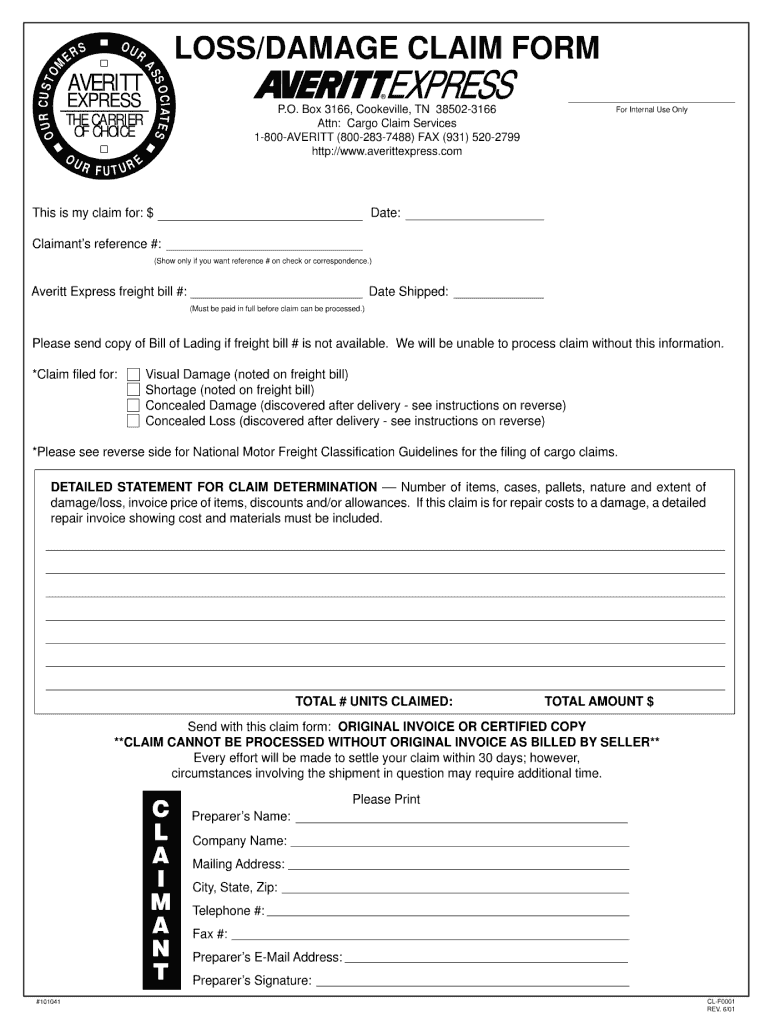
OM ER S OU R LOSS/DAMAGE CLAIM FORM AS CU ST EXPRESS THE CARRIER OF CHOICE OU R FUT UR E AVERITT SOC I AT E S P.O. Box 3166, Cookeville, TN 38502-3166 Attn: Cargo Claim Services 1-800-AVERITT (800-283-7488).
Loading

Open form follow the instructions

Easily sign the form with your finger

Send filled & signed form or save
How to fill out the Averitt Form CL-F0001 online
Filling out the Averitt Form CL-F0001 online is a straightforward process that allows users to submit their information efficiently. This guide will provide a clear and structured approach to help you complete the form accurately.
Follow the steps to successfully complete the Averitt Form CL-F0001.
- Use the ‘Get Form’ button to access the Averitt Form CL-F0001 and open it in your preferred editor.
- Begin by entering your personal details in the designated fields, ensuring that you provide accurate information, such as your name and contact information.
- Next, navigate to the section that requires you to enter specific information related to the form's purpose. Carefully follow any guidelines provided, as this ensures a complete submission.
- Review all entered information for accuracy. It's important to double-check spelling and numerical entries to avoid potential delays.
- Once you have completed the form, you can choose to save your changes, download a copy for your records, print the form, or share it, as needed.
Start completing your Averitt Form CL-F0001 online now for a seamless experience.
Experience a faster way to fill out and sign forms on the web. Access the most extensive library of templates available.
Related content
by MO Ogunyankin · 2018 · Cited by 39 — The laser fluence to trigger nanobubbles...
by MJ Medley — ... form. The SFWMD has 30 days to review the application and ask for...
Get answers to your most pressing questions about US Legal Forms API.
How to file a claim with Averitt Express?
Filing a claim with Averitt Express is an easy process. You can submit your claim online through their website or by contacting customer service for guidance. If you are managing your shipment with Averitt Form CL-F0001, having all necessary documentation ready will aid in processing your claim faster. This proactive approach will help ensure smooth resolution of any issues.
How to schedule Averitt pickup?
Scheduling your pickup with Averitt is straightforward. You can do this by calling their customer service or using the online scheduling feature on their website. Having Averitt Form CL-F0001 ready will help ensure you provide all necessary details. This method not only saves time but also improves the efficiency of the scheduling process.
Are Averitt trucks automatic?
Yes, Averitt has made significant investments in its fleet, resulting in many automatic trucks being part of their operations. This provides drivers with an easier and more comfortable driving experience. If you need to know more about the operational benefits of using automatic trucks, including those relevant to Averitt Form CL-F0001, you can find more details on their website. This change is part of Averitt’s commitment to efficiency and driver satisfaction.
How do I track my shipment with Averitt?
You can easily track your shipment with Averitt by visiting their website and entering your tracking number. This feature allows you to monitor the status of your package in real-time. If you are using Averitt Form CL-F0001 to manage your shipment, tracking helps ensure everything is on schedule. For additional assistance, customer service is always available.
What is the phone number for Averitt pickup?
To schedule a pickup with Averitt, you can reach their customer service at 1-800-283-7488. This number connects you directly to a representative who can assist you in arranging your pickup. For those using Averitt Form CL-F0001, this number is crucial for seamless communication. Be prepared with your shipment details for a smoother process.
How much do Averitt Express drivers make?
Averitt Express drivers enjoy competitive salaries that vary based on experience and position. On average, drivers can earn between $50,000 to $75,000 annually, depending on their route and seniority. Benefits, including health insurance and retirement plans, further enhance the overall compensation package. Joining Averitt means being part of a reputable company that values and rewards its workforce.
What kind of trucks does Averitt use?
Averitt utilizes a mix of modern tractors and trailers, specifically designed for durability and efficiency. Their fleet includes both refrigerated and dry van trucks, accommodating diverse shipping requirements. This commitment to maintaining a versatile fleet enhances their delivery capabilities and overall service quality.
What does Averitt Express do?
Averitt Express specializes in logistics and transportation services, including freight shipping and dedicated trucking solutions. They serve a variety of industries, providing tailored services to meet client needs. With their use of resources like the Averitt Form CL-F0001, they enhance the customer experience by making shipping straightforward and efficient.
Who owns Averitt Trucking?
Averitt Trucking operates under the ownership of Averitt Express, Inc., a privately held company. Founded in 1971, the company has grown significantly and continues to provide comprehensive transportation solutions. Their commitment to service excellence contributes to their standing in the market, particularly with documents like the Averitt Form CL-F0001.
How many trucks does U.S. Xpress have?
U.S. Xpress operates a fleet of approximately 6,000 trucks, offering ample capacity to meet customer requests. With a focus on efficiency and customer satisfaction, they utilize their fleet for various shipping services across the nation. While they may have fewer trucks than Averitt, they still provide competitive solutions within the industry.
Use professional pre-built templates to fill in and sign documents online faster. Get access to thousands of forms.
If you believe that this page should be taken down, please follow our DMCA take down process here.