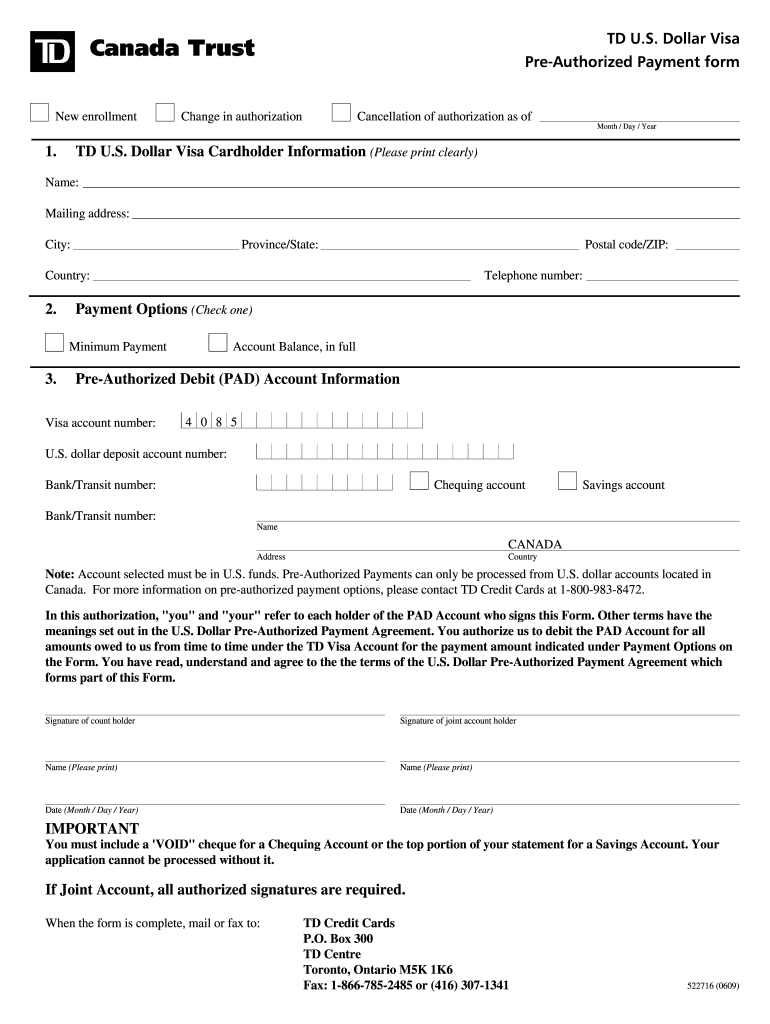
TD U.S. Dollar Visa Pre-Authorized Payment form CLEAR FIELDS New enrollment Change in authorization Cancellation of authorization as of Month / Day / Year 1. TD U.S. Dollar Visa Cardholder Information.
Loading

Open form follow the instructions

Easily sign the form with your finger

Send filled & signed form or save
How to fill out the Td Bank Pre Authorized Debit Form online
Filling out the Td Bank Pre Authorized Debit Form online can be a straightforward process when you have clear guidance. This comprehensive guide will walk you through each section and field of the form to ensure that you complete it correctly and efficiently.
Follow the steps to successfully complete your form online.
- Click ‘Get Form’ button to access the Td Bank Pre Authorized Debit Form and open it in your preferred editor.
- In the first section labeled 'TD U.S. Dollar Visa Cardholder Information', clearly print your name, mailing address, city, province/state, postal code/ZIP, and country. Ensure that all information is accurate to avoid processing delays.
- Enter your telephone number in the specified field. This contact information is important for any follow-up regarding your application.
- Under 'Payment Options', select one of the following by checking the appropriate box: 'Minimum Payment' or 'Account Balance, in full'.
- In the 'Pre-Authorized Debit (PAD) Account Information' section, provide your Visa account number and the U.S. dollar deposit account number from which payments will be processed.
- Indicate the bank/transit number for your account. Select whether this account type is ‘Chequing’ or ‘Savings’. Note that payments must be debited from U.S. dollar accounts located in Canada.
- Sign the form where indicated, first providing the signature of the account holder, followed by the joint account holder if applicable. Print names below each signature along with the date of signing.
- Before submitting, attach a 'VOID' cheque for a Chequing Account or the top portion of your statement for a Savings Account, as necessary. Ensure all required signatures are present.
- Finally, you can either mail the completed form to TD Credit Cards at the specified address or fax it using the provided fax numbers.
Start completing your Td Bank Pre Authorized Debit Form online today to streamline your payment process.
Experience a faster way to fill out and sign forms on the web. Access the most extensive library of templates available.
Related content
Aug 20, 2020 — overdraft and furnishing activities of TD Bank, N.A. (Respondent, as...
Steps for Pre-Approval. forms Gift Card Request Form. Custodian/Study Coordinator ... a...
Get answers to your most pressing questions about US Legal Forms API.
How do I print a direct deposit form TD?
Log in to EasyWeb and select the account you would like to set up for a direct deposit. Click the Direct Deposit Form (PDF) link on your account page. The information will be displayed in a new window with the ability to print or save it on your computer.
How do I get a void Cheque TD?
If you have a cheque: Simply write "void" across it in large letters and provide that. Or you can just provide the important numbers that appear on your cheque as shown here. You won't need the cheque number. If you don't have a cheque:
What is a preauthorized debt?
A Preauthorized Debit Account (PDA) is an account that gives your bank the authority to deduct automatically your defaulted Federal education debt repayments from your checking/savings account.
What is a bank pad form?
A PAD is an agreement between a customer and a biller. When you enter into a PAD agreement with a biller, you give that organization permission to withdraw money from your bank account on a regular basis.
How do I print direct deposit form TD?
Log in to EasyWeb and select the account you would like to set up for a direct deposit. Click the Direct Deposit Form (PDF) link on your account page. The information will be displayed in a new window with the ability to print or save it on your computer.
Is pre authorized debit safe?
Over-billing is the biggest risk of pre-authorized payment. Pre-authorized payment (PAP) seems like a convenient way to pay your bills. With PAP, you can set it and forget it. The money is automatically deducted from your bank account each month like clockwork. But PAP isn't without its risks.
How do I get a pre authorized debit form from TD?
To obtain your account information and download a pre-filled form for Direct Deposits (or Pre-Authorized Debits): After you log in to EasyWeb: Select Accounts in the left menu. Select the account for which you require Direct Deposit information (or Pre-Authorized Debit Payments)
What is a pre authorized debit form?
Pre-authorized debits (PADs) are a convenient way to pay bills and make payments automatically. Instead of waiting for its customer to send a payment, a company or financial institution is given permission to debit a customer's bank account when the payment is due.
What counts as a pre authorized payment?
Pre-authorized payments, also known as direct debits and pre-authorized debits, are amounts that you authorize to be taken from your bank or credit card account on a regular basis to pay for a service or goods. This might include things like your cell phone bill or a gym membership.
How do I set up a pre authorized debit?
Setting up a pre-authorized debit agreement It must be sent at least 3 days before the first withdrawal from your account and include the details of the agreement. You must provide your banking information as part of the pre-authorized debit agreement. Your financial institution may ask you to provide a blank cheque.
Use professional pre-built templates to fill in and sign documents online faster. Get access to thousands of forms.
If you believe that this page should be taken down, please follow our DMCA take down process here.