Loading
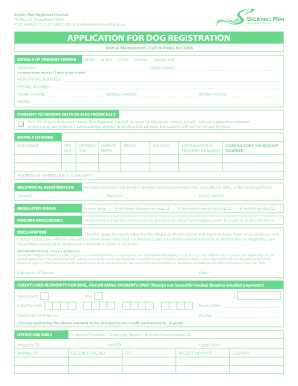
Get Scenic Rim Dog Registration
How it works
-

Open form follow the instructions
-

Easily sign the form with your finger
-

Send filled & signed form or save
How to fill out the Scenic Rim Dog Registration online
Completing the Scenic Rim Dog Registration online is a straightforward process designed to ensure that all domestic dogs are registered in accordance with local laws. This guide will provide you with step-by-step instructions to ensure a smooth and efficient submission.
Follow the steps to successfully complete your registration
- Click ‘Get Form’ button to access the Scenic Rim Dog Registration form and open it in the designated editor.
- In the 'Details of Primary Owner' section, select your title (Mr, Mrs, Ms, or Miss) by ticking the relevant box. Then, provide your surname and given names. Ensure that the primary owner is at least 17 years old.
- Enter your residential address, postal address, home phone number, mobile phone number, work phone number, and email address in the respective fields. If you consent to receive notices electronically, tick the corresponding box.
- In the 'Details of Dogs' section, fill in your dog's name, sex (male/female), desexed status (yes/no), date of birth, breed, colour, and any distinguishing features or marks.
- Provide the compulsory microchip number for your dog and indicate where the dog will be kept.
- If applicable, complete the 'Reciprocal Registration' section by noting any animals currently registered in another local government area. Fill in the relevant council name, tag numbers, and expiry dates.
- Indicate if your dog is a regulated dog by selecting the appropriate options for dangerous, menacing, or restricted dogs.
- Read the declaration statement carefully. By signing, you confirm that the information provided is accurate and agree to abide by Council Local Laws.
- Sign and date the form at the bottom. This confirms your application.
- If payment is required, complete the credit card authority section as needed, ensuring you include the card number and expiry date. Once completed, save your changes, and choose whether to download, print, or share the form.
Begin your Scenic Rim Dog Registration online today for a hassle-free experience!
Council has a strict policy allowing residents in the region to keep only two dogs per property. However, residents can apply for an animal-keeping licence to keep more than two dogs on the one property for more than two months.