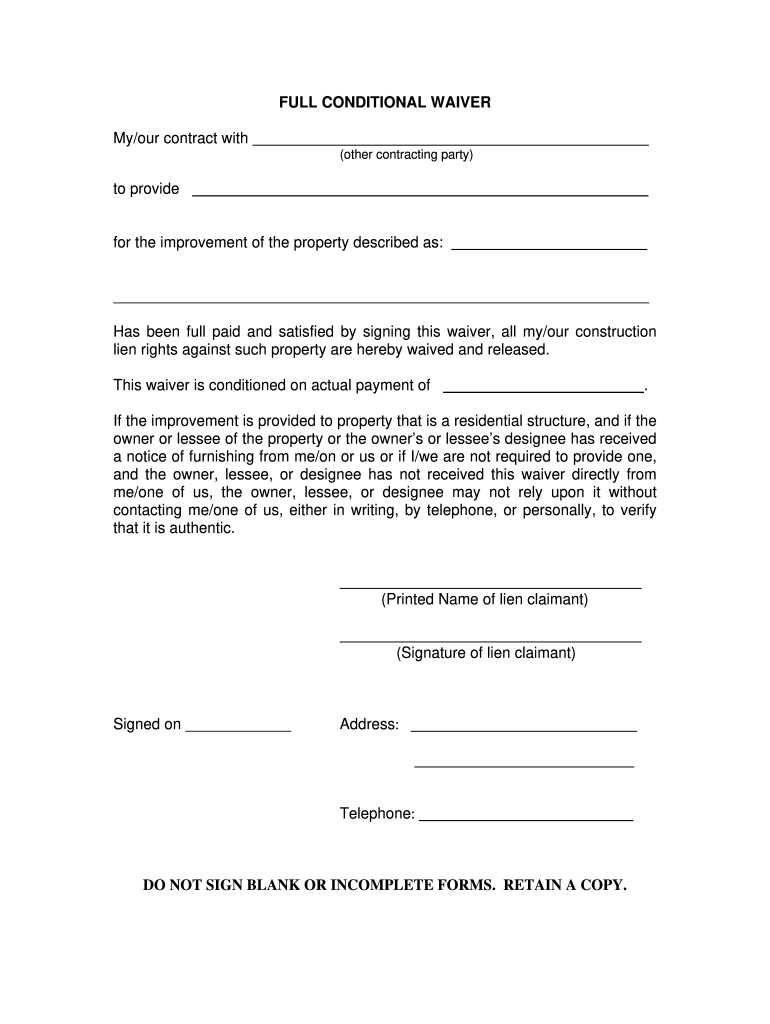
E form for any reason click the Clear button FULL CONDITIONAL WAIVER My/our contract with (other contracting party) to provide for the improvement of the property described as: Has been full paid and satisfied by signing this waiver, all my/our construction lien rights against such property are hereby waived and released. This waiver is conditioned on actual payment of . If the improvement is provided to property that is a residential structure, and if the owner or lessee of the property o.

Open form follow the instructions

Easily sign the form with your finger

Send filled & signed form or save
How to fill out the MI Full Conditional Waiver online
The MI Full Conditional Waiver is a crucial document used to waive construction lien rights under specific conditions. This guide offers a clear, step-by-step approach for filling out this form online, ensuring that users can navigate through the process with confidence and clarity.
Follow the steps to fill out the MI Full Conditional Waiver effectively
- To start, click the ‘Get Form’ button to obtain the MI Full Conditional Waiver document and open it in your preferred editing interface.
- Next, enter the name of the other contracting party in the specified section to delineate who the waiver is addressing.
- In the next field, describe the type of improvement that has been made on the property. Be specific about the nature of the work completed.
- Provide a detailed description of the property where the improvement has occurred. Include the complete address to ensure proper identification.
- Indicate the amount that has been fully paid for the improvement in the specified field. This amount is critical for validating the waiver.
- In the area designated for the printed name, clearly write the name of the lien claimant — the person or entity that is waiving their lien rights.
- Next, sign the document in the available signature field. Make sure the signature matches the printed name to maintain authenticity.
- Include the date on which the waiver is signed in the designated area to record the official acknowledgment of the waiver.
- Finally, provide your address and telephone number. This information is essential for any follow-up or verification related to the waiver.
- After confirming all fields are complete and accurate, you can save your changes, download the document, or print it directly. Make sure to retain a copy for your records.
Complete your MI Full Conditional Waiver online today for a seamless experience.
Experience a faster way to fill out and sign forms on the web. Access the most extensive library of templates available.
Related content
... waiver. (4) A partial conditional waiver of lien or a full conditional waiver of lien...
FULL CONDITIONAL WAIVER - MICHIGAN STATE UNIVERSITY (MSU). Our contract with to furnish...
WARNING: Do not place this product in a position where anyone could walk on, trip over, or...
Get answers to your most pressing questions about US Legal Forms API.
Who is the claimant on a conditional waiver?
The claimant on a conditional waiver is typically the contractor or subcontractor who has provided services or materials for a project. In terms of a MI Full Conditional Waiver, the claimant waives their right to file a lien in exchange for payment for their work. It is essential for claimants to understand their rights and obligations when using such waivers to ensure they protect their interests throughout the project.
What is a final waiver of lien in Michigan?
A final waiver of lien in Michigan signifies that a contractor or supplier has received full payment for their work, and thus waives any future lien rights against the property. This important document, often referred to within the context of a MI Full Conditional Waiver, provides peace of mind to property owners and ensures that all payments have been settled. It acts as a formal record that confirms completion and satisfaction of obligations.
What is a full conditional waiver?
A full conditional waiver is a legal document that waives a contractor's or subcontractor's right to claim a lien on a property in exchange for payment. This MI Full Conditional Waiver ensures that once you receive the payment, you relinquish any future claims against the property for the specified amount. Understanding this waiver helps maintain clarity and protects both parties' interests in a project.
How to fill out a conditional waiver?
Filling out a MI Full Conditional Waiver involves a few straightforward steps. Begin by stating your full name and contact information, followed by the names of other parties involved. Ensure you specify the payment amount being waived, and do not forget to include the project’s information to avoid any confusion.
How to fill out a conditional waiver form?
To fill out a MI Full Conditional Waiver form, start by entering the project details, such as the property address and project number. Next, clearly identify the payment amount being waived, ensuring you include any relevant invoice numbers. Finally, both parties—the contractor and the property owner—must sign and date the form to validate the waiver.
What is the difference between unconditional and conditional waivers?
The key difference between unconditional and conditional waivers lies in the conditions of payment. A conditional waiver, such as the MI Full Conditional Waiver, requires that payment be received before releasing lien rights. Alternatively, an unconditional waiver relinquishes lien rights immediately, regardless of whether payment has been made, which can be riskier for those providing services.
Who is the customer on a lien waiver?
The customer on a lien waiver refers to the entity or individual who hired the contractor or subcontractor for the project. In a MI Full Conditional Waiver context, the customer may include general contractors, property owners, or developers. Clarifying this relationship helps ensure that all parties understand their rights and obligations.
Do Michigan lien waivers need to be notarized?
In Michigan, lien waivers do not typically need to be notarized; however, it is advisable to confirm specific project requirements. While completing a MI Full Conditional Waiver, ensuring all parties have signed can help avoid potential issues in the future. Always check local regulations to stay compliant.
How to complete a final waiver of lien?
To complete a final waiver of lien, gather all necessary information about the project and the parties involved. Clearly state that it is a final waiver and specify the amount being waived. Using resources like US Legal Forms can simplify this process by providing templates designed to meet Michigan's legal requirements.
How do you fill out a conditional waiver and release?
Filling out a conditional waiver and release involves several steps. First, start by clearly identifying the project, the claimant, and the amount being waived. Include the date of the waiver and ensure you select whether it’s a full or partial waiver to align with the requirements of a MI Full Conditional Waiver.
Use professional pre-built templates to fill in and sign documents online faster. Get access to thousands of forms.
If you believe that this page should be taken down, please follow our DMCA take down process here.