Loading
Get Kaiser Admission Worksheet Subscriber
How it works
-

Open form follow the instructions
-

Easily sign the form with your finger
-

Send filled & signed form or save
How to fill out the Kaiser Admission Worksheet Subscriber online
Filling out the Kaiser Admission Worksheet Subscriber is essential to ensure a smooth admission process. This guide provides step-by-step instructions to help you accurately complete the form online.
Follow the steps to effectively fill out the admission worksheet.
- Click ‘Get Form’ button to obtain the form and open it in the editor.
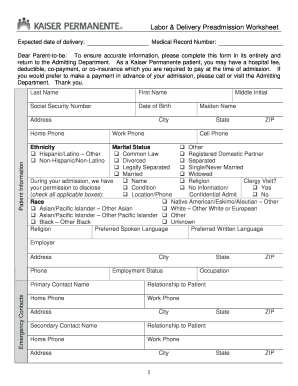
- Begin by entering your personal information in the Patient Information section. This includes your last name, first name, middle initial, maiden name, date of birth, and social security number.
- Fill out your contact details, including your home phone, work phone, cell phone, and address, including city, state, and ZIP code.
- Indicate your marital status by checking the appropriate box that describes your current relationship status.
- In the section for 'During your admission,' mark whether you consent to disclose your condition and provide any necessary clergy information if applicable.
- Complete the race, ethnicity, and language sections by checking all boxes that apply to you.
- Provide your employer's information, including the employer name, address, phone number, and your occupation.
- List primary and secondary emergency contacts, including their names, relationships to you, and their contact information.
- If applicable, indicate whether you have an Advance Health Care Directive by checking 'Yes' or 'No.' If you do, remember to provide a copy to the Admitting Department.
- Fill out the Subscriber Information section with the necessary details about the subscriber, including their relationship to you and all relevant contact information.
- Complete the Other Insurance Information section if applicable, including details about any other insurance you hold.
- Review all the information you've entered for accuracy. Make any necessary corrections.
- Once you're satisfied with the form, you can save your changes, download a copy for your records, print it, or share it as required.
Complete your Kaiser Admission Worksheet Subscriber online today for a seamless experience!