Loading
Form preview
  • US Legal Forms
  • Other Templates
  • More Forms
  • More Multi-State Forms
  • Sample Weekly Activity Schedule

Get Sample Weekly Activity Schedule

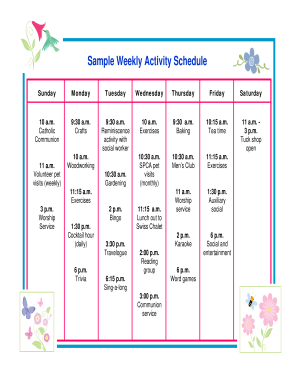
Exercises 9:30 a.m. Baking 10:15 a.m. Tea time 11 a.m. 3 p.m. Tuck shop open 10:30 a.m. SPCA pet visits (monthly) 10:30 a.m. Men s Club 11:15 a.m. Exercises 11 a.m. Worship service 1:30 p.m. Auxiliary social 2 p.m. Karaoke 6 p.m. Social and entertainment 11 a.m. Volunteer pet visits (weekly) 10 a.m. Woodworking 10:30 a.m. Gardening 11:15 a.m. Exercises 3 p.m. Worship Service 2 p.m. Bingo 1:30 p.m. Cocktail hour (daily) 6 p.m. Trivia 3:30 p.m. Travelogue 11:15 a.m. Lunch out t.

How it works

  1. Open form

    Open form follow the instructions

  2. Easily sign form

    Easily sign the form with your finger

  3. Share form

    Send filled & signed form or save

How to fill out the Sample Weekly Activity Schedule online

This guide provides comprehensive instructions on how to complete the Sample Weekly Activity Schedule online. By following these steps, users can efficiently organize and document their weekly activities.

Follow the steps to accurately complete your weekly activity schedule.

  1. Click ‘Get Form’ button to obtain the form and open it in your preferred editor.
  2. Begin with the first section, titled 'Sunday.' Here, input the activity scheduled for each time slot, ensuring clarity about the nature of the activity.
  3. Proceed to 'Monday' and repeat the process, documenting each scheduled activity at the appropriate time. Be consistent with formatting.
  4. Continue through 'Tuesday,' 'Wednesday,' 'Thursday,' 'Friday,' and 'Saturday.' Each section should list the relevant activities lined up for that day, maintaining uniformity in time formatting.
  5. After entering all activities, review the entire schedule for accuracy. Check that all activities are placed in their respective time slots without overlapping.
  6. Once satisfied with the completion of the form, you can save your changes. Options typically include downloading, printing, or sharing your completed schedule as needed.

Start filling out your Sample Weekly Activity Schedule online today!

Get form

Experience a faster way to fill out and sign forms on the web. Access the most extensive library of templates available.
Get form

Related content

Creating Structure | Activities | Essentials |...
Exit Notification / Disclaimer Policy. Close. Links with this icon indicate that you are...
Learn more
Weekly Planner: 30 minute intervals – Learning...
Both Peer Tutoring and Academic Coaching can help you create a balanced approach to...
Learn more
GAO-12-120G, GAO Schedule Assessment Guide
May 30, 2012 — example, certain activities that only the government can perform, such...
Learn more

Related links form

IN Holy Cross College Waiver Release And Indemnification Agreement 2019 St. Barths Bucket Regatta Disclaimer Of Liability And Crew List 2017 St. Barths Bucket Regatta Disclaimer Of Liability And Crew List 2018 St. Barths Bucket Regatta Disclaimer Of Liability And Crew List 2022

Questions & Answers

Get answers to your most pressing questions about US Legal Forms API.

Contact support

Make a List. First, write down everything you need to get done daily, both in your home life and at work. ... Structure Your Day. ... Get Specific (Optional) ... Schedule in Time for Flexibility. ... Test Drive Your New Routine.

Step 1: Define the Schedule Activities. ... Step 2: Sequence the Activities. ... Step 3: Estimate the Resources Needed for the Activity. ... Step 4: Estimating the Duration of Each of the Activities. ... Step 5: Schedule Development. ... Step 6: Monitoring and Controlling the Schedule.

Add activities and milestones and schedule them in time. ... Break down the activities into smaller segments of work. ... Connect the activity to a board. ... Break down the activities into cards. ... Follow up on progress and re-plan. ... Set the activity as done.

Start Excel and open a new, blank workbook. Select the cell range A1:E2, then select Merge & Center in the Alignment group of the Home tab. Type "WEEKLY SCHEDULE" into A1:E2, change the font size to 18, and select Middle Align in the Alignment group.

Open Microsoft Word and click the "File" tab in the menu bar at the top of the screen. Select "New" from the menu and choose "Schedule" from the list of templates that appears.

Plan for real life. Be realistic about what you can accomplish each day. ... Give yourself enough time. Budget at least 1 hour of homework for every hour of class time. Plan study time. ... Plan time for fun. ... Don't over commit. ... Spread things out.

Deliverables. Tasks. Task start and end dates. Task dependencies. Project Calendar. Work Packages. Task duration and project timeline. Budgets.

Plan for real life. Be realistic about what you can accomplish each day. ... Give yourself enough time. Budget at least 1 hour of homework for every hour of class time. Plan study time. ... Plan time for fun. ... Don't over commit. ... Spread things out.

Step 1: Define the Schedule Activities. ... Step 2: Sequence the Activities. ... Step 3: Estimate the Resources Needed for the Activity. ... Step 4: Estimating the Duration of Each of the Activities. ... Step 5: Schedule Development. ... Step 6: Monitoring and Controlling the Schedule.

Open a new document. To get started, open a brand new Google Doc. ... Add a table. Next, add a table to make your calendar squares. ... Include your dates. Complete your calendar by adding in your dates: ... Make it your own.

Get This Form Now!

Use professional pre-built templates to fill in and sign documents online faster. Get access to thousands of forms.
Get form
If you believe that this page should be taken down, please follow our DMCA take down processhere.
Get Sample Weekly Activity Schedule
Get form
  • Adoption
  • Bankruptcy
  • Contractors
  • Divorce
  • Home Sales
  • Employment
  • Identity Theft
  • Incorporation
  • Landlord Tenant
  • Living Trust
  • Name Change
  • Personal Planning
  • Small Business
  • Wills & Estates
  • Packages A-Z
  • Affidavits
  • Bankruptcy
  • Bill of Sale
  • Corporate - LLC
  • Divorce
  • Employment
  • Identity Theft
  • Internet Technology
  • Landlord Tenant
  • Living Wills
  • Name Change
  • Power of Attorney
  • Real Estate
  • Small Estates
  • Wills
  • All Forms
  • Forms A-Z
  • Other Templates
  • Legal Hub
  • About Us
  • Help Portal
  • Legal Resources
  • Blog
  • Affiliates
  • Contact Us
  • Delete My Account
  • Site Map
  • Industries
  • Forms in Spanish
  • Localized Forms
  • State-specific Forms
  • Forms Kit
  • Real Estate Handbook
  • All Guides
  • Notarize
  • Incorporation services
  • For Consumers
  • For Small Business
  • For Attorneys
  • USLegal
  • FormsPass
  • pdfFiller
  • signNow
  • altaFlow
  • DocHub
  • Instapage
Form Packages
  • Adoption
  • Bankruptcy
  • Contractors
  • Divorce
  • Home Sales
  • Employment
  • Identity Theft
  • Incorporation
  • Landlord Tenant
  • Living Trust
  • Name Change
  • Personal Planning
  • Small Business
  • Wills & Estates
  • Packages A-Z
Form Categories
  • Affidavits
  • Bankruptcy
  • Bill of Sale
  • Corporate - LLC
  • Divorce
  • Employment
  • Identity Theft
  • Internet Technology
  • Landlord Tenant
  • Living Wills
  • Name Change
  • Power of Attorney
  • Real Estate
  • Small Estates
  • Wills
  • All Forms
  • Forms A-Z
  • Other Templates
Customer Service
  • Legal Hub
  • About Us
  • Help Portal
  • Legal Resources
  • Blog
  • Affiliates
  • Contact Us
  • Delete My Account
  • Site Map
  • Industries
  • Forms in Spanish
  • Localized Forms
  • State-specific Forms
  • Forms Kit
Legal Guides
  • Real Estate Handbook
  • All Guides
Prepared for you
  • Notarize
  • Incorporation services
Our Customers
  • For Consumers
  • For Small Business
  • For Attorneys
Our Sites
  • USLegal
  • FormsPass
  • pdfFiller
  • signNow
  • altaFlow
  • DocHub
  • Instapage
Social Media
Call us now toll free:
+1 833 426 79 33
As seen in:
© Copyright 1999-2026 airSlate Legal Forms, Inc. 17 Station Street, Ste. 203, Brookline, MA 02445
  • Your Privacy Choices
  • Terms of Service
  • Privacy Notice
  • Content Takedown Policy
  • Bug Bounty Program