Loading
Get Olympia School District Extended School Year Parent Letter 2011-2026
How it works
-

Open form follow the instructions
-

Easily sign the form with your finger
-

Send filled & signed form or save
How to fill out the Olympia School District Extended School Year Parent Letter online
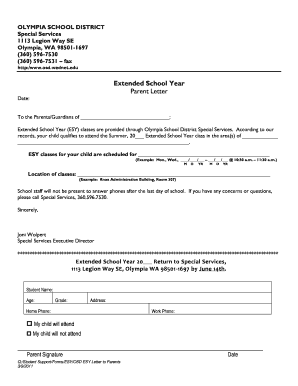
This guide provides clear and concise instructions on how to properly complete the Olympia School District Extended School Year Parent Letter online. By following these steps, you can ensure that your child’s information is accurately submitted for Extended School Year classes.
Follow the steps to successfully complete the form online.
- Click ‘Get Form’ button to access the form and open it in your editor.
- Fill in the date at the top of the letter to indicate when you are completing the form.
- Provide the name of the parent or guardian in the designated space, ensuring it reflects the person responsible for the child.
- In the section indicating eligibility, write the area(s) in which your child qualifies for Extended School Year classes.
- Enter the scheduled dates for the ESY classes, including the days of attendance and session times in the provided format.
- Detail the location of the classes by stating the specific site and room number as indicated in the example.
- Indicate your child’s name, age, and grade on the return section of the document, making sure all information is accurate.
- Include your home and work phone numbers to ensure the school can contact you if necessary.
- Select the appropriate option regarding your child’s attendance by marking either 'my child will attend' or 'my child will not attend'.
- Sign and date the form at the bottom, ensuring that the signature belongs to the responsible parent or guardian.
- After completing the form, save your changes, download the document, print it out, or share it as needed before returning it to Special Services.
Complete the Olympia School District Extended School Year Parent Letter online today!