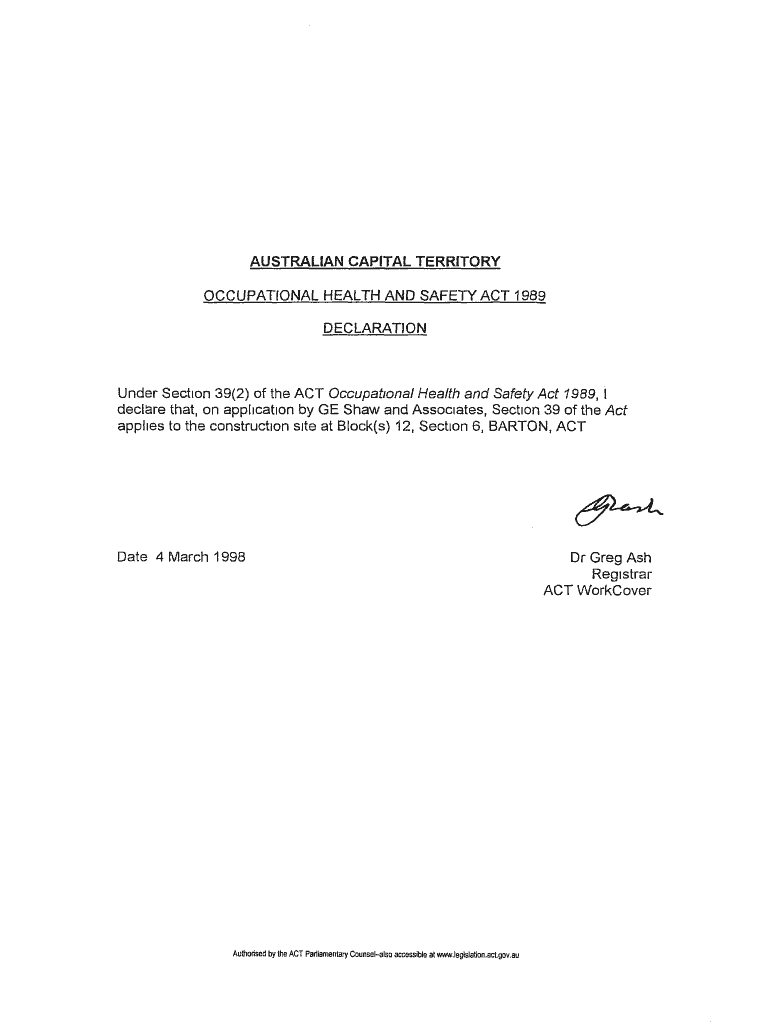
AUSTRALIAN CAPITAL TERRITORY OCCUPATIONAL HEALTH AND SAFETY ACT 1989 DECLARATIONUnder Secton39(2) of the ACT OccupatonalHealth and Safety Act 1989, 1 declare that, on appllcatonby GE Shaw and Associates,.
Loading

Open form follow the instructions

Easily sign the form with your finger

Send filled & signed form or save
How to fill out the AU Capital Territory Declaration online
This guide provides comprehensive instructions on filling out the AU Capital Territory Declaration form online. Following the steps outlined will help ensure that your declaration is completed accurately and efficiently.
Follow the steps to complete your declaration smoothly.
- Click ‘Get Form’ button to access the form and open it in the document interface.
- Begin filling out the declaration by providing your details in the required fields. Ensure that all information is accurate and complete.
- In the section regarding the application, specify the name of the organization making the application, in this case, GE Shaw and Associates.
- Next, identify the location of the construction site by inserting the Block number, Section number, and locality (for example, Block 12, Section 6, Barton, ACT) within the designated areas.
- Review the date field to enter the relevant date for the declaration, which should be formatted correctly.
- Finalize the declaration by signing it digitally if required or indicating your position, for example, 'Registrar,' followed by your name.
- Once you have completed all the sections and reviewed your entries for accuracy, save your changes. You have the option to download, print, or share the completed form as needed.
Complete your AU Capital Territory Declaration online today to ensure compliance and efficiency.
Experience a faster way to fill out and sign forms on the web. Access the most extensive library of templates available.
Related content
Australasian Legal Information Institute (AustLII), a joint facility of UTS and UNSW...
The National Rugby League (NRL) is Australia's top-level domestic men's rugby league club...
Get answers to your most pressing questions about US Legal Forms API.
Who can give statutory declaration in Australia?
You can use a notary public to witness your statutory declaration even if they are called something different under another country's legislation. For example, they may be called a notary or a public notary.
When did the Australian Capital Territory gain self government?
Self-government. The enactment on 6 December 1988 of the Australian Capital Territory (Self-Government) Act 1988 established the framework for ACT Self-government. The first election for the 17-member Australian Capital Territory Legislative Assembly was held on 4 March 1989.
How do I fill out a statutory declaration form?
When you write a statutory declaration, you should include: your full name. your address. your occupation. a statement that you "do solemnly and sincerely declare".
How do I get a statutory declaration form in Australia?
Fill in the statutory declaration form online and download for signing. Fill in and download a Commonwealth Statutory Declaration using the form below. To be valid, you must download your form as a PDF and then sign it in front of an authorised witness. The download button is at the bottom of this webpage.
Where can I get a stat dec form for Canberra?
Where do I get a statutory declaration (Stat Dec) form? Visit the Commonwealth Attorney-General's Department website and follow the links to download a blank statutory declaration Form.
Why is Australian Capital Territory not a state?
The Australian territories are not part of any state. Unlike a state, territories do not have legislations to create laws for themselves, so they rely on the federal government to create and approve the laws. Territories are not claimed by any state so the Australian Parliament directly controls them.
Where can I get a stat dec form near Australian Capital Territory?
Visit the Commonwealth Attorney-General's Department website and follow the links to download a blank statutory declaration Form.
How do you write a stat Dec in Australia?
A statutory declaration is a written statement that you (the declarant) sign and declare to be true and correct in the presence of an authorised witness....Sign and date the last page their name. personal or professional address, and. their qualification as a statutory declaration witness.
Use professional pre-built templates to fill in and sign documents online faster. Get access to thousands of forms.
If you believe that this page should be taken down, please follow our DMCA take down process here.