Loading
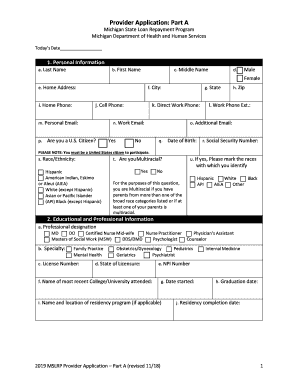
Get Mi Provider Application: Part A 2018
How it works
-

Open form follow the instructions
-

Easily sign the form with your finger
-

Send filled & signed form or save
How to fill out the MI Provider Application: Part A online
This guide provides step-by-step instructions for successfully completing the MI Provider Application: Part A online. The application is essential for providers seeking to participate in the Michigan State Loan Repayment Program.
Follow the steps to complete your application with ease.
- Press the ‘Get Form’ button to access the application form, which will open in your browser for online completion.
- Begin by filling out the personal information section. Enter your last name, first name, and middle name as required. Indicate your gender and provide your home address, including city, state, and zip code. Ensure to include your home phone, cell phone, and email addresses. Confirm your U.S. citizenship status by selecting yes or no.
- Continue to the educational and professional information section. Select your professional designation from the available options, such as MD or Nurse Practitioner. Provide your license number, state of licensure, and NPI number, along with details about your most recent educational institution and residency program, if applicable.
- In the MSLRP agreement information section, select the statement that best describes your agreement with your employer regarding employer contributions. You may also indicate your priority status for the selection process by checking the appropriate box.
- For participant status information, indicate whether this will be your first MSLRP loan repayment agreement. If you have participated previously, fill in the necessary details for your current and past agreements as instructed.
- In the practice site information section, confirm your employment details. Indicate the name and address of your practice site, including the expected hours you will work there each week. Provide additional practice sites if applicable.
- Complete the loan information section, providing details about your current loans and any original loans that have been consolidated. Ensure to answer accurately, especially regarding any service obligation requirements.
- Finally, read the certification statement carefully. Sign and date the application to confirm that all information provided is accurate and complete.
- Once you have filled out all sections of the form, review the information for accuracy. You can then save your changes, download, print, or share the completed application as required.
Complete your MI Provider Application: Part A online today to ensure your eligibility for the program.
Get form
Experience a faster way to fill out and sign forms on the web. Access the most extensive library of templates available.
For assistance in enrolling please call 1-800-292-2550 option 4. Effective October 1, 2019, providers who prescribe drugs to Medicaid beneficiaries must be actively enrolled in CHAMPS.
Get This Form Now!
Use professional pre-built templates to fill in and sign documents online faster. Get access to thousands of forms.