Loading
Get In State Form 55658 2016-2026
How it works
-

Open form follow the instructions
-

Easily sign the form with your finger
-

Send filled & signed form or save
How to fill out the IN State Form 55658 online
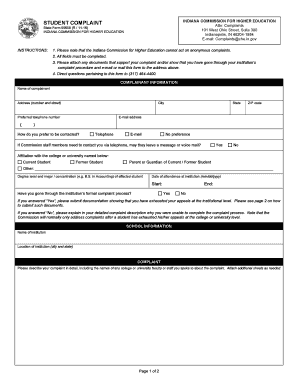
Filling out the IN State Form 55658 online is an essential step for individuals looking to formally submit a complaint to the Indiana Commission for Higher Education. This guide provides a clear, step-by-step approach to help users complete the form accurately and efficiently.
Follow the steps to fill out the IN State Form 55658 online effectively.
- Click ‘Get Form’ button to access the form and open it in your preferred editor.
- Begin by completing the complainant information section. Enter your name, address, city, state, ZIP code, preferred telephone number, and email address.
- Indicate your preferred method of contact by selecting either telephone, email, or no preference. Also, specify if Commission staff can leave a message if they contact you by telephone.
- Select your affiliation with the institution: current student, former student, parent or guardian, or other. You may also need to provide the degree level and major of the affected student.
- Fill in the dates of attendance at the institution in the format mm/dd/yyyy.
- Respond to whether you have gone through the institution’s formal complaint process by selecting 'Yes' or 'No'. If you selected 'Yes', be prepared to attach supporting documentation.
- In the school information section, provide the name and location of the institution where the complaint originated.
- Describe your complaint in detail, including any individuals you spoke to regarding the issue. If necessary, attach additional sheets for a comprehensive explanation.
- On the continuation page, provide titles and contact information for the individuals mentioned previously, if applicable.
- Indicate how you would like your complaint to be addressed. Remember that certain complaint types, such as grades, cannot be reviewed.
- Confirm if you will be submitting additional support documentation, checking 'Yes' or 'No' as appropriate.
- Affirm the statement confirming your relationship to the affected student, and sign and date the form to certify its accuracy.
- Finally, after completing the form, save your changes, and explore options to download, print, or share the completed form.
Complete your complaints online now to ensure your issue is addressed effectively.