Loading
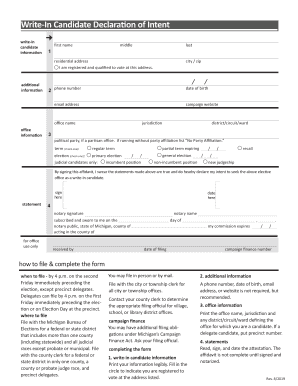
Get Mi Write-in Candidate Declaration Of Intent 2019-2026
How it works
-

Open form follow the instructions
-

Easily sign the form with your finger
-

Send filled & signed form or save
How to fill out the MI Write-In Candidate Declaration Of Intent online
This guide provides comprehensive instructions on how to complete the MI Write-In Candidate Declaration Of Intent form online. By following these steps, you will ensure your declaration is filled out accurately and submitted on time.
Follow the steps to successfully complete your declaration.
- Press the ‘Get Form’ button to access the MI Write-In Candidate Declaration Of Intent form and open it in your editing interface.
- Fill out the 'Write-in candidate information' section. Clearly print your first name, middle name (if applicable), and last name. Ensure your residential address is entered accurately, as you must be registered and qualified to vote at this address.
- Provide your additional contact information. Enter your city, zip code, phone number, date of birth, email address, and campaign website. While a phone number, date of birth, email address, or website is not mandatory, it is recommended to facilitate contact.
- Complete the 'Office information' section. Indicate the office name you are seeking, followed by the jurisdiction and any applicable district, circuit, or ward. If you are running as a delegate candidate, please include the precinct number.
- If applicable, indicate your political party affiliation. If you are running without party affiliation, list 'No Party Affiliation.' Select the term for which you are running: regular term or partial term expiring. Additionally, identify the type of election: primary election, general election, recall, or new judgeship.
- Read the statement carefully, then sign and date the affidavit. Note that the affidavit is incomplete until it is both signed and notarized. Make sure this section is filled accurately.
- Arrange for the notary to sign the document, providing their name and the necessary information verifying their state and county jurisdiction. Ensure the notary's commission expiration date is included.
- Review the entire form for accuracy, making any necessary corrections before submission. Once verified, save your changes, and proceed to download, print, or share your completed form as required.
Complete your MI Write-In Candidate Declaration Of Intent online today!