Loading
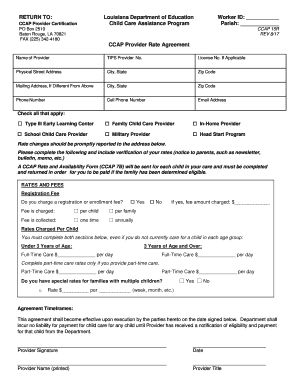
Get La Doe Ccap 15r 2017
How it works
-

Open form follow the instructions
-

Easily sign the form with your finger
-

Send filled & signed form or save
How to fill out the LA DOE CCAP 15R online
Filling out the LA DOE CCAP 15R form is an essential step in ensuring that your child care services are recognized and your rates are documented. This guide will provide you with clear instructions on how to successfully complete the form online.
Follow the steps to fill out the form accurately.
- Click ‘Get Form’ button to obtain the form and open it for completion.
- Begin by entering your Worker ID and Parish in the designated fields.
- Provide the name of the provider along with the TIPS Provider Number and License Number, if applicable.
- Fill in your physical street address, including city, state, and zip code, followed by your mailing address if it differs.
- Enter your phone number and cell phone number, along with your email address for contact purposes.
- Check all the applicable types of care you provide, such as Type III Early Learning Center or Family Child Care Provider.
- Indicate whether you charge a registration or enrollment fee and specify how it is structured.
- Complete the rates charged per child for both age groups: under 3 years and 3 years and over, including full-time and part-time care rates.
- If applicable, state if you have special rates for families with multiple children and detail the rate structure.
- Review the agreement timeframes and record your signature, printed name, title, and date in the required areas.
- Once you have filled out all necessary fields, make sure to save your changes, download, print, or share the form as needed.
Complete your documents online for efficient processing.
Get form
Experience a faster way to fill out and sign forms on the web. Access the most extensive library of templates available.
Related links form
Get This Form Now!
Use professional pre-built templates to fill in and sign documents online faster. Get access to thousands of forms.