Loading
Form preview
  • US Legal Forms
  • Form Library
  • More Forms
  • More Multi-State Forms
  • Fws Asap.gov Participation Request 2011

Get Fws Asap.gov Participation Request 2011-2026

Perate. If you have already completed and sent your ASAP. Gov Participation Form or ASAP Waiver Request form you may disregard this letter. If you have not, follow the instructions in this letter to either enroll in the Automated Standard Application for Payments (ASAP) system or ask for a waiver from using ASAP. The U. S. Fish and Wildlife Service (Service) must move to a new financial system on November 7, 2011. This changes how you will be paid by us for your grant/cooperative agreement. You.

How it works

  1. Open form

    Open form follow the instructions

  2. Easily sign form

    Easily sign the form with your finger

  3. Share form

    Send filled & signed form or save

How to fill out the FWS ASAP.GOV Participation Request online

Filling out the FWS ASAP.GOV Participation Request form is essential for individuals receiving grant or cooperative agreement funds from the U.S. Fish and Wildlife Service. This guide provides clear and supportive step-by-step instructions to help users navigate the process effectively.

Follow the steps to complete your FWS ASAP.GOV Participation Request.

  1. Press the ‘Get Form’ button to obtain the form and open it in your preferred editing tool.
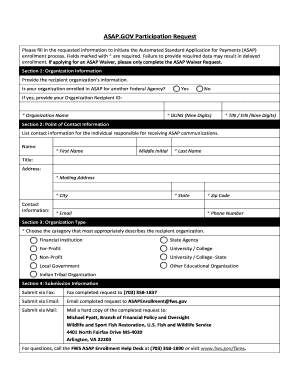
  2. In Section 1, provide the recipient organization's information. If your organization is enrolled in ASAP for another Federal agency, indicate 'Yes' and supply the Organization Recipient ID. Enter your organization name, and as you are exempt from the DUNS number requirement, you may use '00-0000000' for this field. Enter your Social Security Number in the TIN/EIN field.
  3. In Section 2, list the contact information for the individual responsible for receiving ASAP communications. Ensure to fill out first name, middle initial (if applicable), last name, title, mailing address, city, state, zip code, email, and phone number. All fields marked with an asterisk are required.
  4. In Section 3, select the organization type that best describes the recipient organization. Options include: Financial Institution, State Agency, For-Profit, University/College, Non-Profit, University/College - State, Local Government, Other Educational Organization, and Indian Tribal Organization.
  5. Review the completed form for accuracy. Ensure that all necessary fields are filled out and that there are no errors.
  6. Submit the completed form. You can do this via fax, email, or mail. If faxing, send to (703) 358-1837. If emailing, send to ASAPEnrollment@fws.gov. If mailing, address it to Michael Pyatt, Branch of Financial Policy and Oversight, Wildlife and Sport Fish Restoration, U.S. Fish and Wildlife Service, 4401 North Fairfax Drive MS-4020, Arlington, VA 22203.
  7. If you have questions during the process, contact the FWS ASAP Enrollment Help Desk at (703) 358-1890 for assistance.

Complete your FWS ASAP.GOV Participation Request online today to ensure a smooth enrollment process.

Get form

Experience a faster way to fill out and sign forms on the web. Access the most extensive library of templates available.
Get form

Related content

ASAP.GOV Participation Request - US Fish and...
Mail a hard copy of the completed request to: Michael Pyatt, Branch of Financial Policy...
Learn more
Summer Off-Campus Federal Work Study (FWS)...
Some of the participating organizations are: ... Step 2: Complete the “Summer FWS...
Learn more

Related links form

CA JV-296 2007 CA JV-296 S 2007 CA JV-297 2007 CA JV-297 S 2007

Questions & Answers

Get answers to your most pressing questions about US Legal Forms API.

Contact support

ASAP stands for As Soon As Possible.

The Automated Standard Application for Payments (ASAP) is the shared services payment system used by the Department of the Treasury that replaces the Grants Payment Request System (GPRS) for grant payments. Federal agencies enroll recipient organizations, authorize their payments, and manage their accounts.

The Automated Standard Application for Payments (ASAP) is a completely electronic system that federal agencies use to quickly and securely transfer money to recipient organizations. Federal agencies enroll recipient organizations, authorize their payments, and manage their accounts.

What is my ASAP ID? Federal agency employees: Your ASAP ID is your agency's Agency Location Code and Region Code (if applicable). Recipient organization employees: Your ASAP ID is a 7-digit number that you got when you enrolled in ASAP.

Getting Started Make sure your computer can work with ASAP. ... Get an invitation to enroll from the federal agency that will be paying you. ... Enroll online. ... Get a notice that the agency has finished enrolling your organization and that funded accounts are ready for you.

1. From the ASAP.gov home page, hover your mouse over the Payment Request menu button. 2. Click on “Initiate Payment Request (PR)” from the drop-down menu.

What is my ASAP ID? Federal agency employees: Your ASAP ID is your agency's Agency Location Code and Region Code (if applicable). Recipient organization employees: Your ASAP ID is a 7-digit number that you got when you enrolled in ASAP.

Get This Form Now!

Use professional pre-built templates to fill in and sign documents online faster. Get access to thousands of forms.
Get form
If you believe that this page should be taken down, please follow our DMCA take down processhere.
Get FWS ASAP.GOV Participation Request
Get form
  • Adoption
  • Bankruptcy
  • Contractors
  • Divorce
  • Home Sales
  • Employment
  • Identity Theft
  • Incorporation
  • Landlord Tenant
  • Living Trust
  • Name Change
  • Personal Planning
  • Small Business
  • Wills & Estates
  • Packages A-Z
  • Affidavits
  • Bankruptcy
  • Bill of Sale
  • Corporate - LLC
  • Divorce
  • Employment
  • Identity Theft
  • Internet Technology
  • Landlord Tenant
  • Living Wills
  • Name Change
  • Power of Attorney
  • Real Estate
  • Small Estates
  • Wills
  • All Forms
  • Forms A-Z
  • Form Library
  • Legal Hub
  • About Us
  • Help Portal
  • Legal Resources
  • Blog
  • Affiliates
  • Contact Us
  • Delete My Account
  • Site Map
  • Industries
  • Forms in Spanish
  • Localized Forms
  • State-specific Forms
  • Forms Kit
  • Real Estate Handbook
  • All Guides
  • Notarize
  • Incorporation services
  • For Consumers
  • For Small Business
  • For Attorneys
  • USLegal
  • FormsPass
  • pdfFiller
  • signNow
  • altaFlow
  • DocHub
  • Instapage
Form Packages
  • Adoption
  • Bankruptcy
  • Contractors
  • Divorce
  • Home Sales
  • Employment
  • Identity Theft
  • Incorporation
  • Landlord Tenant
  • Living Trust
  • Name Change
  • Personal Planning
  • Small Business
  • Wills & Estates
  • Packages A-Z
Form Categories
  • Affidavits
  • Bankruptcy
  • Bill of Sale
  • Corporate - LLC
  • Divorce
  • Employment
  • Identity Theft
  • Internet Technology
  • Landlord Tenant
  • Living Wills
  • Name Change
  • Power of Attorney
  • Real Estate
  • Small Estates
  • Wills
  • All Forms
  • Forms A-Z
  • Form Library
Customer Service
  • Legal Hub
  • About Us
  • Help Portal
  • Legal Resources
  • Blog
  • Affiliates
  • Contact Us
  • Delete My Account
  • Site Map
  • Industries
  • Forms in Spanish
  • Localized Forms
  • State-specific Forms
  • Forms Kit
Legal Guides
  • Real Estate Handbook
  • All Guides
Prepared for you
  • Notarize
  • Incorporation services
Our Customers
  • For Consumers
  • For Small Business
  • For Attorneys
Our Sites
  • USLegal
  • FormsPass
  • pdfFiller
  • signNow
  • altaFlow
  • DocHub
  • Instapage
Social Media
Call us now toll free:
+1 833 426 79 33
As seen in:
© Copyright 1999-2026 airSlate Legal Forms, Inc. 17 Station Street, Suite 303, Brookline, MA 02445
  • Your Privacy Choices
  • Terms of Service
  • Privacy Notice
  • Content Takedown Policy
  • Bug Bounty Program