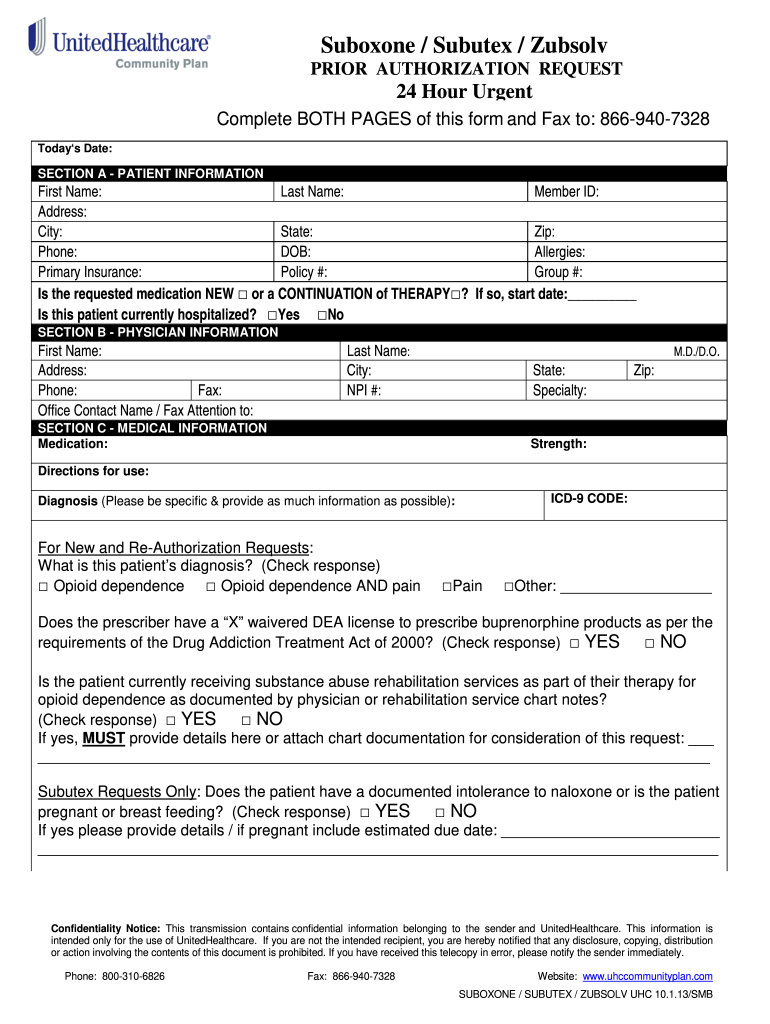
E: Member ID: Address: City: State: Zip: Phone: DOB: Allergies: Primary Insurance: Policy #: Group #: Is the requested medication NEW □ or a CONTINUATION of THERAPY□? If so, start date:__________ Is this patient currently hospitalized? □Yes □No SECTION B - PHYSICIAN INFORMATION First Name: Address: Phone: Fax: Office Contact Name / Fax Attention to: Last Name: City: NPI #: State: Specialty: SECTION C - MEDICAL INFORMATION Medication: Zip: M.D./D.O. Strength: Directions for use: I.

Open form follow the instructions

Easily sign the form with your finger

Send filled & signed form or save
How to fill out and sign UnitedHealthcare Prior Authorization Request online?
Get your online template and fill it in using progressive features. Enjoy smart fillable fields and interactivity.Follow the simple instructions below:
The era of frighteningly intricate legal and tax documents has come to a close. With US Legal Forms, the process of completing legal documents is stress-free. A powerful editor is readily available, providing you with a variety of helpful tools for filling out a UnitedHealthcare Prior Authorization Request. The following suggestions, along with the editor, will guide you through the whole process.
We make filling out any UnitedHealthcare Prior Authorization Request simpler. Utilize it now!
- Click on the orange Get Form button to start improving.
- Enable the Wizard mode in the upper toolbar for additional recommendations.
- Complete every fillable section.
- Verify that the information you submit for the UnitedHealthcare Prior Authorization Request is current and accurate.
- Insert the date on the form using the Date tool.
- Select the Sign tool and generate a signature. You have three options: typing, drawing, or capturing it.
- Ensure that all sections have been filled out correctly.
- Press Done in the upper right corner to save and send or download the document. There are various methods to obtain the document: as an instant download, as an email attachment, or as a hard copy via mail.
Tips on how to fill out, edit and sign UnitedHealthcare Prior Authorization Request online
How to fill and sign UnitedHealthcare Prior Authorization Request
Get your online template and fill it in using progressive features. Enjoy smart fillable fields and interactivity.Follow the simple instructions below:
The era of frighteningly intricate legal and tax documents has come to a close. With US Legal Forms, the process of completing legal documents is stress-free. A powerful editor is readily available, providing you with a variety of helpful tools for filling out a UnitedHealthcare Prior Authorization Request. The following suggestions, along with the editor, will guide you through the whole process.
We make filling out any UnitedHealthcare Prior Authorization Request simpler. Utilize it now!
- Click on the orange Get Form button to start improving.
- Enable the Wizard mode in the upper toolbar for additional recommendations.
- Complete every fillable section.
- Verify that the information you submit for the UnitedHealthcare Prior Authorization Request is current and accurate.
- Insert the date on the form using the Date tool.
- Select the Sign tool and generate a signature. You have three options: typing, drawing, or capturing it.
- Ensure that all sections have been filled out correctly.
- Press Done in the upper right corner to save and send or download the document. There are various methods to obtain the document: as an instant download, as an email attachment, or as a hard copy via mail.
How to edit UnitedHealthcare Prior Authorization Request
How to Modify the Get UnitedHealthcare Prior Authorization Request: Personalize Forms Online
Experience a stress-free and paperless approach to handling the Get UnitedHealthcare Prior Authorization Request. Utilize our reliable online service and save a significant amount of time.
Creating each form, including the Get UnitedHealthcare Prior Authorization Request, from the ground up consumes excessive time, so having a proven platform of pre-prepared document templates can work wonders for your efficiency.
However, managing them can be challenging, particularly with documents in PDF format. Luckily, our extensive catalog includes a built-in editor that allows you to effortlessly fill out and modify the Get UnitedHealthcare Prior Authorization Request without leaving our site, ensuring that you do not waste your valuable time finishing your paperwork. Here's how to handle your file using our tools:
Whether you need to work on an editable Get UnitedHealthcare Prior Authorization Request or any other template in our collection, you are well-prepared with our online document editor. It's straightforward and secure, requiring no special skills.
Our web-based solution is designed to manage practically everything you can imagine regarding document editing and completion. Stop using traditional methods to handle your documents. Opt for a professional solution to assist you in streamlining your tasks and reducing reliance on paper.
- Step 1: Find the required document on our website.
- Step 2: Click Get Form to access it in the editor.
- Step 3: Utilize specialized editing tools that enable you to insert, delete, annotate, and highlight or obscure text.
- Step 4: Create and add a legally binding signature to your document using the sign option from the toolbar above.
- Step 5: If the template layout isn't how you desire it, use the tools on the right to delete, add, and rearrange pages.
- Step 6: Insert fillable fields so that others can be invited to complete the template (if applicable).
- Step 7: Share or distribute the form, print it, or choose the format in which you want to download the document.
How to fill and sign UnitedHealthcare Prior Authorization Request
Get your online template and fill it in using progressive features. Enjoy smart fillable fields and interactivity.Follow the simple instructions below:
The era of frighteningly intricate legal and tax documents has come to a close. With US Legal Forms, the process of completing legal documents is stress-free. A powerful editor is readily available, providing you with a variety of helpful tools for filling out a UnitedHealthcare Prior Authorization Request. The following suggestions, along with the editor, will guide you through the whole process.
We make filling out any UnitedHealthcare Prior Authorization Request simpler. Utilize it now!
- Click on the orange Get Form button to start improving.
- Enable the Wizard mode in the upper toolbar for additional recommendations.
- Complete every fillable section.
- Verify that the information you submit for the UnitedHealthcare Prior Authorization Request is current and accurate.
- Insert the date on the form using the Date tool.
- Select the Sign tool and generate a signature. You have three options: typing, drawing, or capturing it.
- Ensure that all sections have been filled out correctly.
- Press Done in the upper right corner to save and send or download the document. There are various methods to obtain the document: as an instant download, as an email attachment, or as a hard copy via mail.
Experience a faster way to fill out and sign forms on the web. Access the most extensive library of templates available.
Related content
Use the Prior Authorization and Notification tool via our UnitedHealthcare ... Behavioral...
Nov 5, 2024 — The current committee charters will be mailed to shareholders on written...
Get answers to your most pressing questions about US Legal Forms API.
How long do prior authorizations take at UnitedHealthcare?
Overall, prior authorizations at UnitedHealthcare usually take between three to five business days to complete. For urgent requests, the processing time may be shorter. To assist with this process, consider using tools like uslegalforms to simplify documentation and ensure all necessary forms are prepared efficiently.
How long does it take for UnitedHealthcare to approve prior authorization?
Approval times for a UnitedHealthcare Prior Authorization Request can fluctuate based on the nature of the request. Generally, expect a decision within five business days for routine requests. If additional information is needed, this may extend the approval time. Effective communication and timely submissions can help expedite the process.
How long does it take for a prior authorization to go through?
The time it takes for a UnitedHealthcare Prior Authorization Request to process varies by the service requested. Typically, most requests are resolved within a few business days. However, some complex requests may take longer. Always check the status through the provider portal for the most accurate updates.
How do I submit a prior authorization for UnitedHealthcare?
To submit a UnitedHealthcare Prior Authorization Request, use the provider portal or submit a request through your practice management system. Ensure you have all required patient information, diagnosis codes, and the necessary clinical documentation ready. Doing this will streamline the process and improve the chances of a quicker approval.
Is UHC getting rid of prior authorization?
Currently, UnitedHealthcare has not announced plans to eliminate the prior authorization process. Prior authorization remains a key component in managing healthcare costs while ensuring that patients receive appropriate care. It helps confirm the medical necessity of certain services and treatments. It's important to stay updated as policies may evolve.
What is the number for UnitedHealthcare prior authorization?
For assistance with your UnitedHealthcare Prior Authorization Request, you can reach their dedicated support line at 1-800-555-1234. Calling this number will connect you with representatives who can guide you through the process. Make sure to have your member details ready for a more efficient conversation. This step can significantly reduce any confusion.
What are the steps of the authorization process?
The authorization process generally includes the identification of the service requiring approval, gathering all relevant medical documents, and filling out the UnitedHealthcare Prior Authorization Request form. After submission, UnitedHealthcare will review the information and provide a decision. Keep track of the request's status to ensure timely follow-up.
How do you process prior authorization?
Processing a prior authorization for UnitedHealthcare involves several steps. Begin with confirming the need for authorization based on the patient's plan. Then, complete the UnitedHealthcare Prior Authorization Request with accurate and thorough information, and submit it through the appropriate channel.
How do you do a preauthorization?
To perform a preauthorization for UnitedHealthcare, collect patient diagnosis, treatment plans, and any supporting documents. Fill out the UnitedHealthcare Prior Authorization Request form thoroughly. You can submit this online or via a phone call, depending on your preference or technical comfort.
How to process prior authorization?
To process a UnitedHealthcare Prior Authorization Request, start by gathering all necessary medical documentation and patient information. Next, complete the authorization request form, ensuring you include all relevant details. Lastly, submit the request through the UnitedHealthcare online portal or by contacting their customer service.
Use professional pre-built templates to fill in and sign documents online faster. Get access to thousands of forms.
If you believe that this page should be taken down, please follow our DMCA take down process here.