Loading
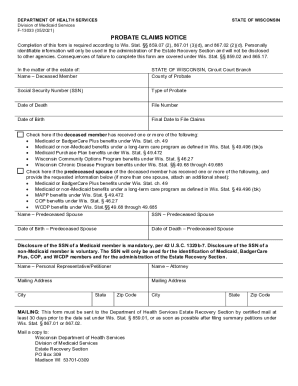
Get Wi Dhs F-13033 2021-2026
How it works
-

Open form follow the instructions
-

Easily sign the form with your finger
-

Send filled & signed form or save
How to fill out the WI DHS F-13033 online
Completing the WI DHS F-13033 form is an essential step in the probate process in Wisconsin. This guide provides a clear and supportive walkthrough on how to fill out this document online, ensuring you have the necessary information to complete it accurately.
Follow the steps to fill out the WI DHS F-13033 form accurately
- Click ‘Get Form’ button to access the form and open it in the editor.
- Fill out the first section with information about the deceased member. This includes their name, Social Security number, type of probate, date of death, date of birth, and file number.
- Next, indicate the final date to file claims by entering the specific date in the relevant field.
- Complete the checkboxes regarding any Medicaid or BadgerCare Plus benefits received by the deceased member, as well as any benefits received by a predeceased spouse if applicable.
- If a predeceased spouse is indicated, provide their name, Social Security number, date of birth, and date of death in the provided fields.
- Fill in the name and contact information for the personal representative or petitioner, as well as the attorney if applicable. Include mailing addresses, city, state, and zip code for both.
- Make sure to carefully review all filled fields for accuracy before finalizing the form.
- Once you've completed the form, you can save your changes, download the document, print it, or share it as required.
Complete the necessary documents online efficiently and accurately.