Loading
Get Mo 580-2994 2020-2026
How it works
-

Open form follow the instructions
-

Easily sign the form with your finger
-

Send filled & signed form or save
How to fill out the MO 580-2994 online
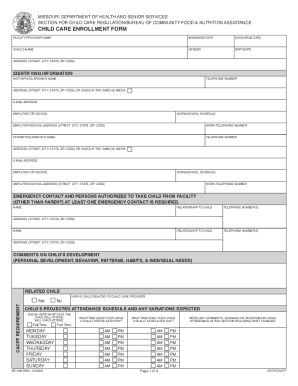
Filling out the MO 580-2994 form can be straightforward with the right guidance. This document is crucial for enrolling a child in a child care facility, ensuring all necessary information is accurately provided.
Follow the steps to complete the MO 580-2994 form online.
- Click ‘Get Form’ button to obtain the MO 580-2994 document and open it in your preferred online editor.
- Start filling out the top section with the facility or provider name, admission date, and discharge date. Ensure that all written information is clear and correctly spelled.
- Provide identifying information for the child, including their name, gender, and birthdate, followed by the address details (street, city, state, ZIP code).
- Enter the mother’s or guardian’s information, including their name, telephone number, email address, and employer or school details. If the information is the same as above, check the indicated box.
- Repeat the process for the father’s or guardian’s information, ensuring to include the same type of contact and employment details.
- List at least one emergency contact who can take the child from the facility if necessary. Provide their relationship to the child and contact information.
- In the comments section, note any relevant information about the child’s development, behavior patterns, and individual needs.
- Indicate your child's projected attendance schedule by checking the appropriate days of the week and specifying arrival and departure times.
- Select the meals your child is usually given at the facility by checking the applicable options.
- Review the authorization for emergency medical care section, ensuring that emergency contacts and preferred facilities are accurately listed.
- Acknowledge the facility's policies by reviewing them and providing your initials in the necessary sections.
- Finally, sign and date the form in the designated areas for the parent or guardian. Ensure that all information is accurate before submitting.
- Once completed, save your changes, download the form, print it if necessary, or share it as needed.
Start the process of completing the MO 580-2994 online today!