Loading
Get Wa Doh 348-013 2019
How it works
-

Open form follow the instructions
-

Easily sign the form with your finger
-

Send filled & signed form or save
How to fill out the WA DOH 348-013 online
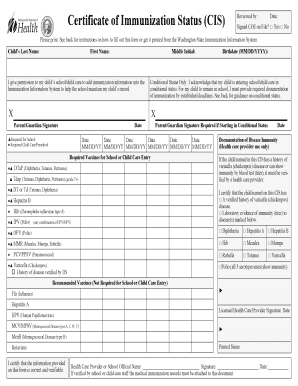
The Washington Department of Health Form 348-013, also known as the Certificate of Immunization Status (CIS), is essential for documenting a child’s immunization history. This guide provides clear, step-by-step instructions on how to accurately complete this form online.
Follow the steps to complete the form effectively.
- Click ‘Get Form’ button to access the WA DOH 348-013 and open it in your editor.
- Begin filling out the child's information. Enter the child’s last name, first name, middle initial, and birthdate in the specified fields.
- Provide your permission for the child’s school or child care to add immunization information into the Immunization Information System. Ensure to check the appropriate box.
- If applicable, indicate whether the child is entering school or child care in conditional status by checking the corresponding box.
- Sign the form as the parent or guardian, and date the signature accurately. If starting in conditional status, ensure you sign in the designated area.
- Record the date of each vaccine dose received in the date columns. Use the format MM/DD/YY and refer to the provided Reference Guides for accurate vaccine names.
- If the child has a history of varicella (chickenpox) disease, ensure a health care provider verifies this and checks the appropriate box in the Documentation of Disease Immunity section.
- In case of positive immunity from a blood test (titer), a health care provider must indicate this by checking the relevant boxes and signing the form.
- Attach any required medical records that are medically verified. This includes the completed hardcopy form with provider validation.
- Once you have filled out all necessary information, save your changes, download the completed form, and print or share it as needed.
Ensure your child's immunization records are complete and file the WA DOH 348-013 online today.
Get form
Experience a faster way to fill out and sign forms on the web. Access the most extensive library of templates available.
Related links form
Get This Form Now!
Use professional pre-built templates to fill in and sign documents online faster. Get access to thousands of forms.