Loading
Get Ca Anthem Gc4050 2017-2026
How it works
-

Open form follow the instructions
-

Easily sign the form with your finger
-

Send filled & signed form or save
How to fill out the CA Anthem GC4050 online
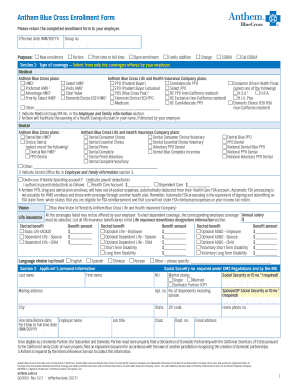
Filling out the CA Anthem GC4050 enrollment form is a crucial step for users seeking health coverage. This guide provides a clear, step-by-step approach to ensure that you complete the form accurately and efficiently.
Follow the steps to complete your enrollment form online.
- Click the ‘Get Form’ button to obtain the enrollment form. This will open the form for you to fill out in the editor.
- Begin by indicating the type of enrollment. Choose from options such as new enrollment, re-hire, part-time to full-time transition, or family addition based on your current situation.
- Section 1 allows you to select your type of coverage. Choose either medical, dental, vision, or life insurance from the options listed. Be sure to review the specific plans provided by your employer to select the appropriate one.
- Complete Section 2 with your personal information, including your last name, first name, Social Security number, marital status, and contact details.
- In Section 3, list yourself and any eligible family members you wish to enroll. Include their names, relationship to you, and relevant information.
- If you wish to decline any coverage, fill out Section 4 by indicating which coverage you are declining and the reason for your decision.
- For COBRA/Cal-COBRA enrollments, complete Section 5 with the required information regarding your qualifying event and coverage dates.
- In Section 6, answer questions regarding any other coverage you or your dependents may have. This is essential for proper coverage evaluation.
- Section 9 is for selecting primary and contingent beneficiaries for life insurance. Provide the necessary details for each beneficiary.
- Finally, review Section 10 to ensure that all information is accurate. Sign and date the form to confirm your consent.
- Once you have completed and reviewed the entire form, save your changes, and download or print a copy for your records.
Complete your CA Anthem GC4050 form online now to ensure your health coverage is secured.