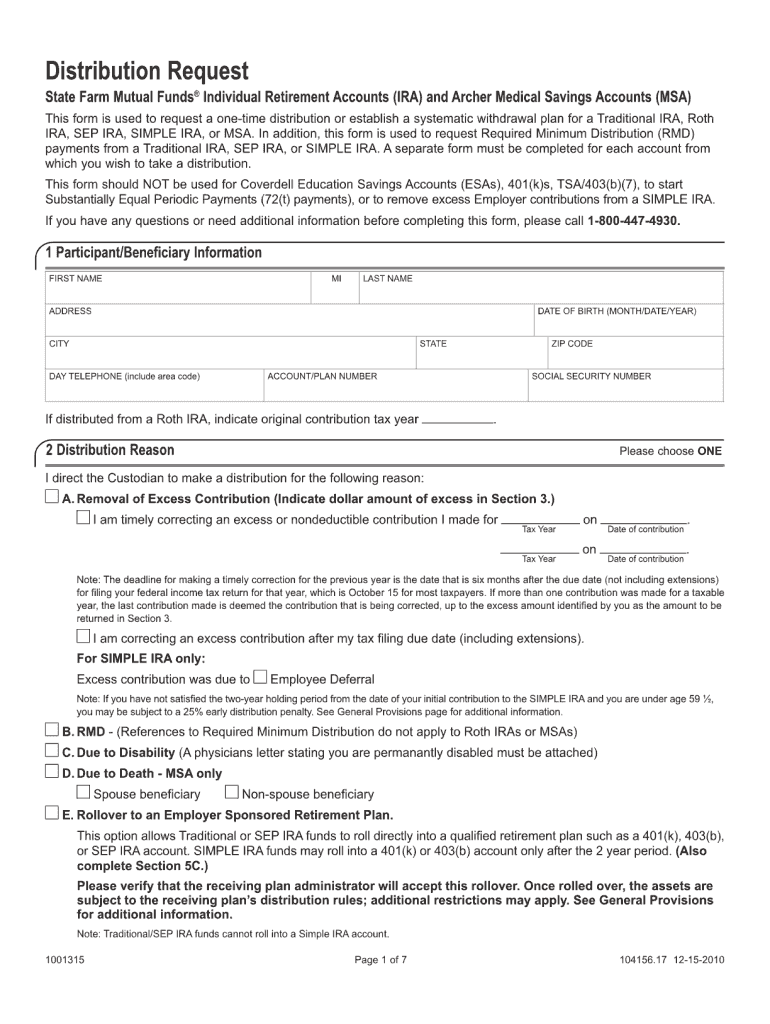
Distribution Request State Farm Mutual Funds Individual Retirement Accounts (IRA) and Archer Medical Savings Accounts (MSA) This form is used to request a one-time distribution or establish a systematic.

Open form follow the instructions

Easily sign the form with your finger

Send filled & signed form or save
How to fill out the State Farm 1001315 online
Filling out the State Farm 1001315 form online can seem daunting, but with the right guidance, it can be a straightforward process. This guide provides clear, step-by-step instructions to help you navigate each component of the form with ease.
Follow the steps to complete the State Farm 1001315 form online
- Click ‘Get Form’ button to obtain the form and open it in the online editor.
- Review the introductory section of the form, which typically explains the purpose of the document and any important instructions. Make sure to read this carefully.
- Fill out your personal information in the designated fields. This usually includes your full name, mailing address, phone number, and email address.
- Provide details regarding the insurance coverage or claims related to the form. Be as precise as possible to ensure accurate processing.
- If applicable, include any additional information or documentation requested by the form instructions. This could be related to previous claims, incident details, or beneficiary information.
- Review all entered information for accuracy. Double-check that there are no errors or omissions that may delay processing.
- Once satisfied with your entries, save your changes. You may also choose to download, print, or share the form as necessary.
Complete your documents online today with confidence!
Experience a faster way to fill out and sign forms on the web. Access the most extensive library of templates available.
Related content
Many states are collecting farm financial data through their own farm analysis programs...
by ME Salassi · 2003 · Cited by 10 — Estimates of the gross farm income, value added...
Get answers to your most pressing questions about US Legal Forms API.
Why would my car insurance refund me?
Your car insurance may refund you for overpayments, changes in your coverage, or after an adjustment due to a claimed situation. Refunds can reflect savings realized by switching plans or policies. State Farm 1001315 is known for its customer-focused approach, ensuring you’re not paying for what you don’t need.
What is the State Farm customer service phone number?
You can reach State Farm’s customer service by calling their main phone number, which is often available on their official website. For inquiries specifically related to State Farm 1001315, it's best to check your policy documents for the most accurate contact information. Customer service representatives are ready to assist you with any questions you may have.
Does State Farm send you a check?
Yes, State Farm does send checks under certain circumstances. You may receive checks for refunds or claim payouts, particularly if you are eligible for a premium refund or if your claim has been approved. With State Farm 1001315, you can expect clear communication regarding any funds they are sending your way.
Why did State Farm send me a refund check?
State Farm may send you a refund check due to various factors such as changes in your policy, overpayment, or a claim settlement. If you notice a refund check from State Farm 1001315, it typically means you have a credit on your account. Reviewing your recent policy changes can help explain why you received this check.
Why is State Farm denying so many claims?
Claims denial can happen for a variety of reasons, including coverage limitations, lack of information, or policy exclusions. Customers often feel frustrated when faced with these denials from State Farm 1001315. Understanding your policy details and ensuring you provide complete documentation when filing a claim could help avoid unnecessary denials.
Why did I get a refund check from State Farm?
A refund check from State Farm could result from various factors, including an adjustment to your premium or an overpayment on your part. Sometimes, State Farm 1001315 provides refunds if your policy coverage changes or if you switch to a different coverage plan. If you're uncertain, checking your account summary can provide clarity.
How does the State Farm claim process work?
The State Farm claims process begins with reporting your claim, followed by an investigation of the details surrounding the incident. After the evaluation, State Farm will communicate the next steps and any potential payouts. Throughout the process, you will receive updates, ensuring you stay informed about the status of your claim.
How well does State Farm handle claims?
State Farm 1001315 is known for its efficient claims handling process. Many customers report positive experiences, citing quick response times and clear communication throughout the claims process. You can rely on State Farm's commitment to support you in managing your claim effectively.
What is the format for State Farm claims number?
The format for a State Farm claims number consists of a series of digits unique to your claim. Typically, the claims number is assigned when you first report the incident and can be found in your claim confirmation email or through your online account. Keeping this number accessible is vital for tracking your claim status.
How can a customer report a claim to State Farm?
A customer can report a claim to State Farm 1001315 through several convenient channels. Options include using the State Farm mobile app, visiting their website, or calling their dedicated claims line. Each method is designed to ensure that you can start your claim easily, no matter your preference.
Use professional pre-built templates to fill in and sign documents online faster. Get access to thousands of forms.
If you believe that this page should be taken down, please follow our DMCA take down process here.
This form is available in several versions. Select the version you need from the drop-down list below.